New Lock screen on top of regular lock screen
- Mark as New
- Bookmark
- Subscribe
- Mute
- Subscribe to RSS Feed
- Permalink
- Report Inappropriate Content
Just a few days ago, I noticed a new lock screen appearing on my Galaxy S5, when I unplug it from the charger. It is full screen, does not have any ads and the background picture changes periodically like a wallpaper slide show. It also says "Good Morning" (or Afternoon, etc. depending on the time of day) and shows the current location and temperature. At the bottom it says slide to unlock. When I slide, it reveals my regular pin pad secure lock screen. It reappears when I plug in the charger and then again when I unplug it, but at no other times. It also started appearing on my wife's S5 today. We don't have any 3rd party battery charging boosters, file managers, etc. that I know of. Could this be some sort of malware? It seems innocuous, but not sure if I can trust it or how to get rid of it. The last software update was about a month ago and this did not appear until just very recently. Has anyone else experienced this or have any ideas?
Solved! Go to Correct Answer
- Mark as New
- Bookmark
- Subscribe
- Mute
- Subscribe to RSS Feed
- Permalink
- Report Inappropriate Content
It's not DTIgnite.
Turns out it's Peel Smart Remote (or just Peel Remote on my phone).
See: Peel remote app upsets users with a ton of ads and lock screen overlays
Apparently its a free app that came automatically installed on this phone and cannot be uninstalled. The "Mute For Now" option will disable the lockscreen 'feature' but not the random, full-page adds. To get rid of those you have to sign up for a monthly $0.99, placing it firmly in the realm of ransomware, as far as I am concerned. Fortunately, you can Force Stop, Disable, and turn off all permissions, notifications, and updates.
- Mark as New
- Bookmark
- Subscribe
- Mute
- Subscribe to RSS Feed
- Permalink
- Report Inappropriate Content
RICMIT32,
I like to know what's going on with my lock screens, too. Can you send us a screenshot of what you are referring to?
JosephT_VZW
Follow us on Twitter @VZWSupport
If my response answered your question please click the 'Correct Answer' button under my response. This ensures others can benefit from our conversation. Thanks in advance for your help with this!
- Mark as New
- Bookmark
- Subscribe
- Mute
- Subscribe to RSS Feed
- Permalink
- Report Inappropriate Content
I've attached a photo of the screen using my Surface. I cannot access any of the phone's other functions without sliding this screen to the right which reveals my regular pin pad lock screen and this screen goes away again until I either plug it into the charger or unplug it from the charge. I've been considering going into a Verizon store to see if someone there can figure it out.
thanks,
- Mark as New
- Bookmark
- Subscribe
- Mute
- Subscribe to RSS Feed
- Permalink
- Report Inappropriate Content
RICMIT32, we won't give up on your lock screen issues. What happens if you go into your settings and completely remove the lock? Do these same issues persist?
SheritaH_VZW
Follow us on Twitter @VZWSupport
If my response answered your question please click the "Correct Answer" button under my response. This ensures others can benefit from our conversation. Thanks in advance for your help with this!!
- Mark as New
- Bookmark
- Subscribe
- Mute
- Subscribe to RSS Feed
- Permalink
- Report Inappropriate Content
Ok I removed the lock altogether; not even swipe to unlock. The lock screen in question still appears when I plug in the charger and requires a slide to unlock. Then my home screen appears. It reappears when I unplug from the charger (by the way this is any micro usb charger).
thanks,
- Mark as New
- Bookmark
- Subscribe
- Mute
- Subscribe to RSS Feed
- Permalink
- Report Inappropriate Content
Thanks for your troubleshooting efforts, RICMIT32. I’m sorry to learn that you continue to have the lock issues even after removing the lock altogether. Please restart your phone in Safe Mode and test: https://www.verizonwireless.com/support/knowledge-base-97645/
AntonioC_VZW
Follow us on TWITTER @VZWSupport
If my response answered your question please click the _Correct Answer_ button under my response. This ensures others can benefit from our conversation. Thanks in advance for your help with this!!
- Mark as New
- Bookmark
- Subscribe
- Mute
- Subscribe to RSS Feed
- Permalink
- Report Inappropriate Content
Hello RICMIT32,
We definitely want to ensure your device is in perfect working order. At this time, we would recommend reaching out to the manufacturer directly. They will be able to determine what new updates have changed the behavior of your lock screen.
ChristopherM_VZW
Follow us on TWITTER @VZWSupport
If my response answered your question please click the _Correct Answer_ button under my response. This ensures others can benefit from our conversation. Thanks in advance for your help with this!!
- Mark as New
- Bookmark
- Subscribe
- Mute
- Subscribe to RSS Feed
- Permalink
- Report Inappropriate Content
Thank you for providing additional details about the screen lock Ricmit32. Having face to face support at the store is nice. Have you been able to take the phone into the store yet? If not, we have ways to remove the screen from your Galaxy S5. You'll want to go to Settings>Security>Trusted Agents>Deactivate Smart Lock. This should remove the double lock screen for you. Let us know how that works out for you.
LaSindaT_VZW
Follow us on Twitter @VZWSupport
If my response answered your question please click the �Correct Answer� button under my response. This ensures others can benefit from our conversation. Thanks in advance for your help with this!!
- Mark as New
- Bookmark
- Subscribe
- Mute
- Subscribe to RSS Feed
- Permalink
- Report Inappropriate Content
I have not been able to get to a store to have them look into this yet; probably tomorrow. When I go to settings>security>trust agents> , the only agent shown is Google and is was already set to Off.
thanks,
- Mark as New
- Bookmark
- Subscribe
- Mute
- Subscribe to RSS Feed
- Permalink
- Report Inappropriate Content
I am also getting the same 2nd locked screen and it just started a couple of days now.
- Mark as New
- Bookmark
- Subscribe
- Mute
- Subscribe to RSS Feed
- Permalink
- Report Inappropriate Content
RICMIT32, are you absolutely sure that your device is the S5? I ask because what you're describing sounds like the Always On Display option that rolled out with the Android 7.0 Nougat update, though that update shouldn't be available for the S5. If you go to Settings > Display, do you have an option there for Always On Display?
- Mark as New
- Bookmark
- Subscribe
- Mute
- Subscribe to RSS Feed
- Permalink
- Report Inappropriate Content
Yes, it's an S5. I bought it over 2 years ago. It has the latest applicable update from sometime around the end of February. And this lock screen is not always on. It only appears when I plug in the charger or unplug the phone from the charger. When it comes on, there is a slide to unlock message at the bottom and when I slide, my pin pad unlock screen appears and this new screen doesn't appear again until I plug or unplug it. It cycles through a slide show of scenes, pictures that are not on my phone. It also says Good Morning (or Afternoon, or Evening depending on the time of day). It also displays the temperature, battery level, and I can scroll up to get a transparent view of the weather forecast shown over the changing scenes. If my ringer is on mute, i.e. vibrate only, there is a message that I might miss a call. It provides a selection of "That's OK" or "I don't want to miss a call". If I select that I don't want to miss a call, it sets the ringer to full volume.
I'm going to a Verizon store tomorrow to see if they can figure this out. It's not unpleasant if it's not some sort of malware. It also has appeared on my wife's S5 for a while, but seems to have gone away and is not affecting hers anymore, but we didn't do anything to make it go away.
- Mark as New
- Bookmark
- Subscribe
- Mute
- Subscribe to RSS Feed
- Permalink
- Report Inappropriate Content
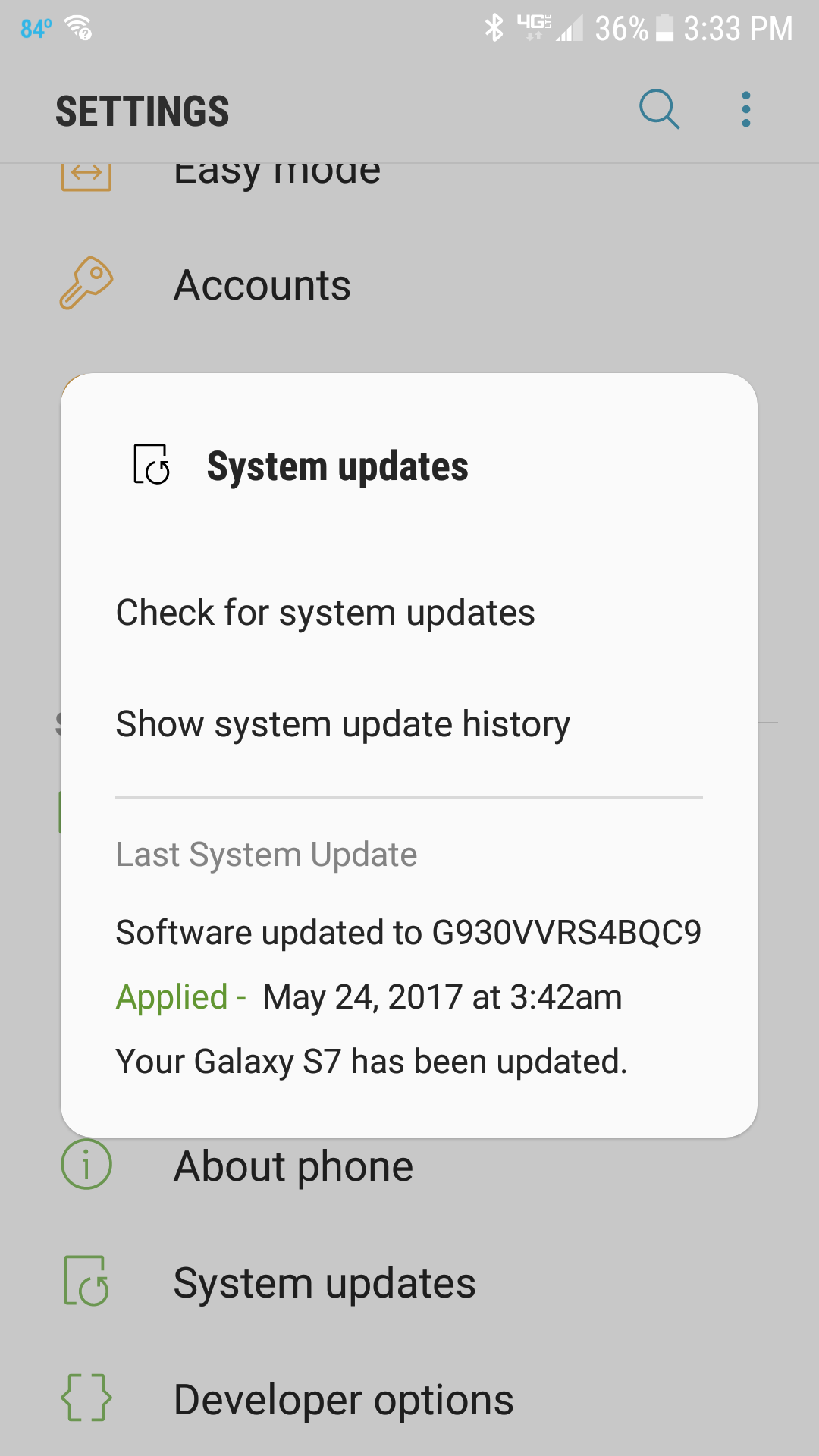
We want to get to the bottom of this immediately. Please go to Settings>System updates and provide the last system update?
MahrizaM_VZW
Follow us on Twitter @VZWSupport
If my response answered your question please click the 'Correct Answer' button under my response. This ensures others can benefit from our conversation. Thanks in advance for your help with this!
- Mark as New
- Bookmark
- Subscribe
- Mute
- Subscribe to RSS Feed
- Permalink
- Report Inappropriate Content
Last system update was G900VVRS2DQB2 applied on Feb 28.
Checking for system updates returns no system update necessary.
- Mark as New
- Bookmark
- Subscribe
- Mute
- Subscribe to RSS Feed
- Permalink
- Report Inappropriate Content
Thanks for checking your current software RICMIT32. Please try resetting the network settings on the device. Here is a link with the steps http://vz.to/2bsCCWq . Also, let us know if your visit to the store was successful with resolving your concerns.
KinquanaH_VZW
Follow us on Twitter @VZWSupport
If my response answered your question please click the �Correct Answer� button under my response. This ensures others can benefit from our conversation. Thanks in advance for your help with this!!
- Mark as New
- Bookmark
- Subscribe
- Mute
- Subscribe to RSS Feed
- Permalink
- Report Inappropriate Content
Had the same problem with mine. Don't know what app it was from, but I disabled it by pressing on the 3 dots on the upper right and selecting Disable...
- Mark as New
- Bookmark
- Subscribe
- Mute
- Subscribe to RSS Feed
- Permalink
- Report Inappropriate Content
This new lock screen just showed up today on my Galaxy S7. I restarted the phone & it temporarily went away. I've tried disabling/enabling notifications from the Apps in settings. There is where the problem lies I believe...I haven't isolated the App that is causing it yet. I have some screenshots...the Golden Gate Bridge photo is mine and is in the mysterious double lock screen. Also, no notifications will show up on the double lock screen...no new email, no new message. I even received a call & had to slide to the right at the bottom to unlock to see who was calling.


- Mark as New
- Bookmark
- Subscribe
- Mute
- Subscribe to RSS Feed
- Permalink
- Report Inappropriate Content
I have this on one of my Android devices but it is from a 3rd party utility app that clears the RAM and junk files etc...
I know you said it isn't from any 3rd party apps like this that you know of but that is honestly what I am guessing it's from.
Are you able to do a screenshot of your apps (go to Application manager/Manage apps>Downloaded Apps)? That may help in determining which it is if this is the cause....
- Mark as New
- Bookmark
- Subscribe
- Mute
- Subscribe to RSS Feed
- Permalink
- Report Inappropriate Content
Hey lukevinyl,
It could be AVG cleaner…there are a [removed] loads of Apps! See all of the attached…
Thanks
Profanity removed as required by the Verizon Wireless Terms of Service
Message edited by Verizon Moderator.
- Mark as New
- Bookmark
- Subscribe
- Mute
- Subscribe to RSS Feed
- Permalink
- Report Inappropriate Content
It could actually be that as I have had that in the past and do remember it coming with it's own "lock screen/smart charge" function.
Don't see any other images or attached info showing apps but it might be AVG which does antivirus and some other cleaning fuctions...
- Mark as New
- Bookmark
- Subscribe
- Mute
- Subscribe to RSS Feed
- Permalink
- Report Inappropriate Content
I believe I found the offending app…Slide Lock has been on my phone forever. In the mysterious double lock screen, you could scroll up for some settings just like in the regular lock screen. I tapped on the wallpaper icon & it took me to the Slide Lock app! I uninstalled Slide Lock & everything seems to be back to normal! Hopefully this solves the double lock screen dilemma for a lot of folks!
Thanks!