Post OTA 5.5.893 battery issue

jpvybes
Enthusiast - Level 2

Prior to the 5.5.893 update this phone actually had very decent battery life. Post update this phone now has horrible life. I've noticed that under the battery usage that Andriod OS is registering close to 50% of the battery usage. I've spoken to both Verizon and Motorola about this issue. Verizon sent a new battery but same issue. I know this isn't a hardware issue. Anyone else?

0 Likes
Reply
24 Replies
ts47
Newbie

You may have an app problem - something that is continually running in the background.  My Android OS is showing 15% usage.  I'm not sure that means anything though.  Battery life DOES seem somewhat worse after the update.  I've read about post update battery issues on other forums too.  Everything else seems somewhat better.


I will say that I had a lag issue caused by one or more apps that I had recently installed.  When the update didn't fix that problem, I did a factory reset and reinstalled the apps I wanted.  That fixed my lag issue.

0 Likes
Reply
rustyfenders
Newbie

Yes. I have the extended battery and the life totally sucks after the update.

0 Likes
Reply
rckt82
Enthusiast - Level 3
I agree.... my battery also runs down much faster. I have a system panel app the records CPU history usage over hours, days, or week. Nothing is running nearly as much as the os and system tasks. I haven't installed any new apps since the update. So that would lead me to believe the update is the culprit.

Also pre and post update I can't toggle my Bluetooth on from the dialer during a call. I have to minimize The dialer window and use the toggle widget on my homesceen to turn it on.
0 Likes
Reply
HighDesert
Contributor - Level 1

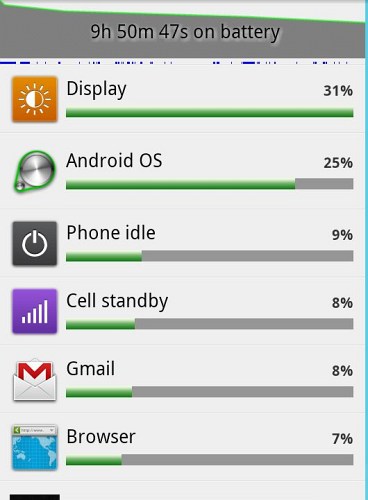
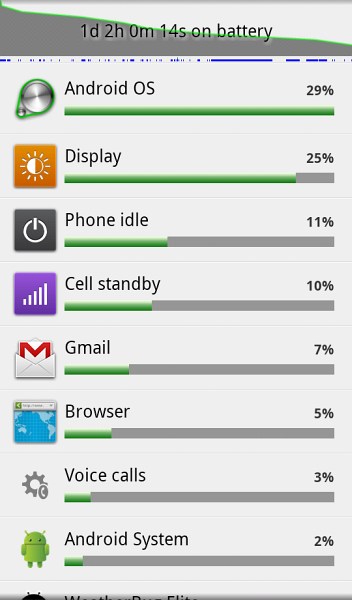
Hmmm....My battery usage profile also now shows Android OS as the biggest user, however, my total battery usage has not gone up.

If anything, battery life has improved...but it's hard to say for sure because no two days are exactly the same.

That being said, battery life seems fine, despite the high usage by "Android OS".

0 Likes
Reply
jpvybes
Enthusiast - Level 2
I have a case open with Motorola tier 3 support so awaiting the phone call. I'll bring this up as well as the data drops I'm still having. Everyone has to start calling Motorola and Verizon if experiencing the same issues. Tried the factory reset too and installing minimal apps but same deal.
0 Likes
Reply
reallyniceguy
Contributor - Level 2
Im probably the oddball here.. my battery life is great after update.
0 Likes
Reply
Albo
Newbie

I had the same issue after the system update.


Tried changing some of the battery settings..no help.


Called Verizon...will send out  a new phone.  I will see how this works with the replacement phone.


If not, next step will be to change to a different phone....no charge...


Good luck all....

0 Likes
Reply
jpvybes
Enthusiast - Level 2

I started out on the Thunderbolt and what a piece of garbage that was. After a replacement or two I got them to give me a Bionic and it was great until this update. Let me know how the replacement goes, I may be soon to follow that route again.

0 Likes
Reply
HighDesert
Contributor - Level 1

As I said a couple of days ago, I've had these same battery-usage statistics -- with Android OS at ~50% (but still had good battery life overall, no worse than before the update.)


Last night I turned the phone off overnight (I hadn't turned it off in several days).  Well, since I turned the phone on this morning the usage statistics are very different...even though I didn't use it any differently.

Seems like something changed by turning it off for several hours.


0 Likes
Reply
HighDesert
Contributor - Level 1

Now that it's been >24 hours since I power-cycled, here's an update on usage statistics:

"Android OS" is now in the lead, though still a long way from the >50% it had been before power-cycling.  I wonder if it'll grow with time-on.  I'll find out.  I have yet to need to power-cycle to fix any "lost data connection" in the 12 days since I got the update, so I can leave it on as long as I want now.


0 Likes
Reply
KDHawk
Newbie

DesertHigh

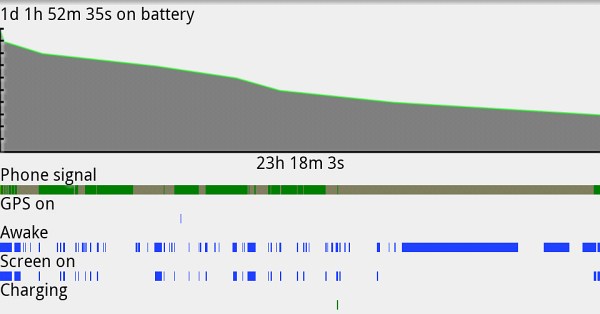
You have a screen shot of battery life showing over 1 day!?!?  Wow!  I am jealous!  What phone is that on and how did you manage that?  I have a Droid Razr - did the OTA update yesterday and my battery life dropped to just a little over 3 hours!!!!  I have worked on it a bit and hoping to show an improvement today.  I think I have maxed at around 12 hours BEFORE this stupid update.  Love to know how you get 1 day!

Thanks!


0 Likes
Reply
HighDesert
Contributor - Level 1

KDHawk wrote:

DesertHigh

You have a screen shot of battery life showing over 1 day!?!?  Wow!  I am jealous!  What phone is that on and how did you manage that?  I have a Droid Razr - did the OTA update yesterday and my battery life dropped to just a little over 3 hours!!!!  I have worked on it a bit and hoping to show an improvement today.  I think I have maxed at around 12 hours BEFORE this stupid update.  Love to know how you get 1 day!

Thanks!


I think the bigger question isn't how do I get >1day, it's why do you only get 3 hours?  I'd say something is seriously wrong with your phone/software...though I don't know what.


I think the relatively-long battery life I get (on my Droid Bionic...that is the phone of this board, after all) is a result of not using the phone for intensive stuff as much as other people.  I don't make many phone calls and I almost never stream video.  I mostly use it for receiving/sending e-mail, checking weather, occasional viewing and posting on the Internet.  Some other stuff, but mostly it's idle.

The secret to long battery life is to not use it! :smileywink:

0 Likes
Reply
Yaterml
Newbie

Post apocalyptic update, my battery life has fallen steeply from about 6-8 hours to about 2-4 hours. I have 2 batteries and external charge I have to flip back and forth several times just to make it through the day. I have had to set my phone up to shut off the 4g/3g connection whenever the screen times out. I have been through 3 phones now, all right about the same and because of having to keep it plugged in my charger has a short developing in the contacts.

0 Likes
Reply
KDHawk
Newbie

No way 2 - 4 hours it acceptable!!  Is this after an update?  I would documenent the issue with Verizon and then demand replacement phone.   Cycle the battery completely down until it turns off and see what happens on the next cycles.  When it charges, take it off charge pretty much as soon as it hits 100%.  

0 Likes
Reply
Yaterml
Newbie

Thats what I am thinking. Before the update I could run a whole work day and not have to recharge, but kept a spare battery with me just in case I needed it or if I would do something battery heavy. This has been the first day that I have been able to fiddle with my phone since I got the OTA update 5.5.893. Since the update I will go from 100% down to 40% or less in just a couple of hours then it takes a few more for it to completely discharge. After the update I have to charge it right after I come back from lunch as its down to 20% or less or switch to my other battery. I have my phone set up to turn off the 3G and 4G radios when the screen times out. This is a pain as it can sometimes take me resetting my phone to restore my data connection. I used to charge it as soon as I got home from work so it would be ready to pull off the charge before I go to bed. I would turn it off until morning, I don't want to leave it on the charger and cause it to suffer voltage depression and loss capacity of the battery by overcharging or overheating. I have cycled this battery to allow it to calibrate to the phone to see if the phone's battery manager will do any better. I am going to see if that helps. I am also going to thin the applications on my phone, but I hope the android system starts running lower on the battery usage. If its going to require me to either keep it on a charger or switching batteries several times a day I am going to be upset. This phone has potential to be the greatest phone in recent years, but its got a lot of issues to get over first. I have advanced task kill set to aggressive where as I used to have it set to safe, and I have also added battery defender to see if the puts a cork in the battery drain. I had way to many issues with juice defender ultimate where I wasn't getting phone calls so I left that alone a long time ago. I hope I can get all these issues fixed, I want to add a lapdock, tablet, mobile hotspot and another smartphone to my plan, but I refuse to do that until this gets resolved.

0 Likes
Reply
Yaterml
Newbie

After fiddling with my phone, putting it on battery saver mode, turning everything that could possibly drain my battery off, I went from 100% this morning at 9:30 to just 30% by lunch 12:30 as of 3:00 my phone has been dead and on the charger.

0 Likes
Reply
Parson
Newbie

These are my statics. They're not entirely accurate because I wasn't studying it on a schedule or using a secondary app that gives accurate data but it's still disturbing how fast my/our batteries are losing power.


90%@24m
80%@1h
70%@2h
40%@5h40m
20%@7h40m


Keep in mind, I'm not a power user. I still prefer what has apparently become old school: a keyboard and mouse attached to a desktop or laptop. I use my phone for primarily three things: phone calls, texting, and trillian. On a daily basis I use it for those and I may check the weather or use the browser. I don't run a bunch of widgets and I have keyboard feedback off along with any vibrate functions.


Prior to this update, I used to easily go a day and a half without having to charge and I'm using the factory battery. Post update, my battery is being sucked dry. Keep in mind my display is off most of the time when I say this, but the display is taking over 40% of the power and the OS coming up at over 25%. What surprises me is that programs I use daily aren't even on the list. Instead my contacts list is way up close to the top (which I rarely, if ever, access). Typically my top ones were Cell Standby and Phone Idle. After this, they're both at 5%.


Another issue is the malfunction of battery saving apps like JuiceDefender. I swear by this app because before I used it my battery had nothing close to what my previous cell had. After installing this update, it's practically not doing anything saying it's giving a multiplier of 1.01 -- this phone used to get 1.4 on average and at one point peaked out at 1.8.


I have little doubt this OTA "update" is the issue. Knowing how companies act also gives me little hope how this will be managed. I was enjoying my Bionic (since I'm not a power user, I have no complaints unlike the terabytes of hate I've seen about the phone) but now I feel like I really can't use it because the battery may suddenly just pop out the back, give me the finger, and go running down the road to go find a more stable platform to power.

0 Likes
Reply
KDHawk
Newbie

I feel like you.  I was happy with  my phone and it's battery performance unlike what seemed like a lot of people constantly complaining about it.  I feel like you are only going to be able to expect a certain amount of battery on a smart phone PARTICUARLY if you USE it!  However, after the update, it went crazy.  I called Verizon to make them aware and document.  I had no intentions of keeping the phone if 3 plus hours was my new normal.  One thing I want to make note of, the techs CLAIMED THAT HAD NO OTHER COMPLAINTS AND DIDN'T HAVE ANY DOCUMENTATION OF THIS BEING AN ISSUE?!!?  Really?  But as stated previously, I have cycled the battery a couple of times.  I let it completely die to turning off.  I have then re-booted it after it charges fully again.  I also remove the charger as soon as it hits 100%.  Today I am on 5%.  I have had 17 hrs 24 minutes on this charge.  My display is using 27% and Android OS shows 24%.  I seem to be at least back to pre-update battery.  I had read from a few other folks that it seemed to go that way for them also.  However, if I had not been able to do that, I would have been calling Verizon again.  I would have been trying to have my phone replaced with one that HAD NOT HAD THE UPDATE!?!!??!!  

0 Likes
Reply
Yaterml
Newbie

Yesterday, I took my phone off the charger at 100% when I got to the gym at 6:30pm and it was dead even before 8:30pm I mean powered itself off dead.

0 Likes
Reply
h20skiracer
Newbie

I've also had HORRIBLE battery life since the last update. IT wasn't great before (and I'm a VERY light user), nad now it dies within 5 hours! With me not using it! Also, sometimes when I plug my phone in to charge it (with the cord and charger that came with the phone) the battery goes to above 105*F and doesn't gain any charge!!!

0 Likes
Reply