How can I do a factory reset on my Galaxy s6 without firmware?
- Mark as New
- Bookmark
- Subscribe
- Mute
- Subscribe to RSS Feed
- Permalink
- Report Inappropriate Content
I have a Galaxy s6 Model SM-G920V phone and cannot get it to turn on. I have tried everything and it is still a brick. I acts like it wants to start, but nothing but black screen. Why can't Samsung or Verizon supply all the necessary software to repair phones or at least do a diagnostic test to see what might be the matter? I'm frustrated also that this phone has a battery installed that can not be removed. God help us! Who in their right mind designs a phone like this?
Solved! Go to Correct Answer
- Mark as New
- Bookmark
- Subscribe
- Mute
- Subscribe to RSS Feed
- Permalink
- Report Inappropriate Content
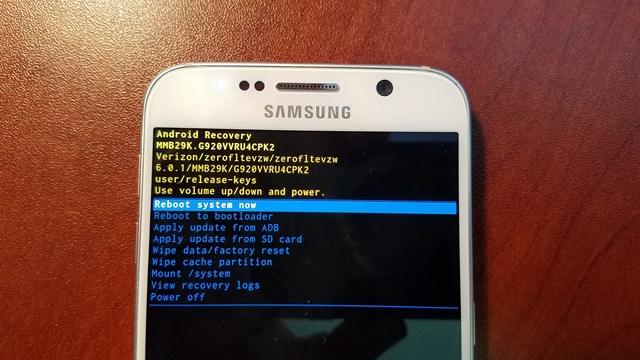
But you do have that recovery screen right? If you use volume down to highlight wipe cache partition and hit power will that work? It should go to another screen that says no yes volume down to say yes and hit power button if that works then should go back to same screen and then just hit the power button on the reboot system now
- Mark as New
- Bookmark
- Subscribe
- Mute
- Subscribe to RSS Feed
- Permalink
- Report Inappropriate Content
How old is your phone? Were You having battery problems with it before this?
Are you able to do Volume down-power-home This will put the phone in download mode
if you have a computer go here and get this and plug your phone into the computer it will see what the problem is. If it is software it will put the latest software on it. If it is the battery or something else like hardware then that will be another avenue you will have to get checked out
Repair Assistant - Software Upgrade Assistant (Samsung) | Verizon Wireless
I just reread your post try doing the Volume up-power-home this will put the phone in recovery mode
and use the volume down to highlight the clear cache partition press power then volume down to say yes
hit power again then volume down to factory reset and power that will do the factory reset and the clear cache partition will clean out any old files that are in the phone
Hope this helps
- Mark as New
- Bookmark
- Subscribe
- Mute
- Subscribe to RSS Feed
- Permalink
- Report Inappropriate Content
You realy don't have a clue how to fix this phone. I suspected as much.
Sent from my Verizon, Samsung Galaxy smartphone
- Mark as New
- Bookmark
- Subscribe
- Mute
- Subscribe to RSS Feed
- Permalink
- Report Inappropriate Content
I apologize if this has not helped with your current phone problem. Does the phone not do anything.
When you do try the volume up -power-home nothing happens? I do agree about not being able to take the battery out is such a dumb thing to do. They would not had to recall the Note 7 if they had just let us replace the battery .I know of one site that maybe able to help you
https://www.sammobile.com/forum/forumdisplay.php?f=885
Again this is just a suggestion
- Mark as New
- Bookmark
- Subscribe
- Mute
- Subscribe to RSS Feed
- Permalink
- Report Inappropriate Content
Someone is trying to help you. Why are you being rude to them??
- Mark as New
- Bookmark
- Subscribe
- Mute
- Subscribe to RSS Feed
- Permalink
- Report Inappropriate Content
OK....I'm slightly frustrated with my s6 and taking it out on "Support Team" is not cool. My bad...can you help me at least load drivers. Every time I connect phone to PC it tries to install drivers and I get the following response.

- Mark as New
- Bookmark
- Subscribe
- Mute
- Subscribe to RSS Feed
- Permalink
- Report Inappropriate Content
I know the feeling, however the person trying to help you isn't the "Support Team". They are a community member like you, and myself and are just trying to help you out.
In any case, with the drivers-- do you know if you have USB debugging enabled by chance?
- Mark as New
- Bookmark
- Subscribe
- Mute
- Subscribe to RSS Feed
- Permalink
- Report Inappropriate Content
I’m not sure. How do I enable debugging?
- Mark as New
- Bookmark
- Subscribe
- Mute
- Subscribe to RSS Feed
- Permalink
- Report Inappropriate Content
Try this first, and then connect to computer to see if driver's update after completing...
- Taken from: USB Debugging Mode - Samsung Galaxy S 6 / S 6 edge | Verizon Wireless
- From a Home screen, navigate: Apps
> Settings > Developer options (System section).
If not available, navigate: Apps > Settings > About phone then tap Build number seven times.
These instructions apply to Standard mode only. - Ensure that the Developer options switch (located in the upper-right) is turned on
. - From the Debugging section, tap USB debugging to turn on or off.
- If prompted, review the message then tap OK to confirm.
- Mark as New
- Bookmark
- Subscribe
- Mute
- Subscribe to RSS Feed
- Permalink
- Report Inappropriate Content
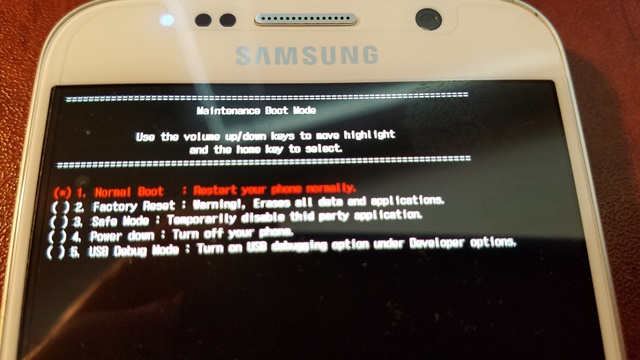
I can't get my phone to start. All I can do is open is the Maintenance Boot Mode. Nothing.
Sent from my Verizon, Samsung Galaxy smartphone
- Mark as New
- Bookmark
- Subscribe
- Mute
- Subscribe to RSS Feed
- Permalink
- Report Inappropriate Content
This is Samsung's help page for your phone .... Galaxy S6 (Verizon) | Owner Information & Support | Samsung US
As far as the usb debug that has to be done with the phone on and you have to have the developer
option on which at this point you can't do. What options do you have in Maintenance Boot Mode?
- Mark as New
- Bookmark
- Subscribe
- Mute
- Subscribe to RSS Feed
- Permalink
- Report Inappropriate Content
Have you tried the factory reset in maintenance boot mode?
- Mark as New
- Bookmark
- Subscribe
- Mute
- Subscribe to RSS Feed
- Permalink
- Report Inappropriate Content
I have tried every option available via Maintenance Boot Mode and now I can't even get the device drivers to load. Battery works and screen works on all the maintenance features. It acts like its going to start when Galaxy s6 logo shows up on screen, but then nothing. No typical vibration at startup.
- Mark as New
- Bookmark
- Subscribe
- Mute
- Subscribe to RSS Feed
- Permalink
- Report Inappropriate Content
I was actually going to recommend what Kathy65793 recommended, if you follow their troubleshooting flow it should ultimately take you to a recovery/repair program that can be run that might be of help.
- Mark as New
- Bookmark
- Subscribe
- Mute
- Subscribe to RSS Feed
- Permalink
- Report Inappropriate Content
Just to confirm, you said you were using Maintenance Boot Mode and I want to make sure this is the same as the Android recovery screen as there are a couple different boot modes that can be loaded. To clarify, you have done this, correct?
Press and hold the Volume Up and Home buttons.
--------------------------------------------------------------------------------
While continuing to hold volume up and home, press and hold the Power button until the Samsung Galaxy S6 screen appears then release all buttons.
--------------------------------------------------------------------------------
From the Android system recovery screen, select wipe data/factory reset.
(volume buttons to cycle through the available options and the power button to select)
--------------------------------------------------------------------------------
Select Yes.
(Allow several seconds for the factory data reset to complete)
--------------------------------------------------------------------------------
Select reboot system now.
- Mark as New
- Bookmark
- Subscribe
- Mute
- Subscribe to RSS Feed
- Permalink
- Report Inappropriate Content
Have you been able to get the drivers loaded on your computer? If you can get that done and try doing Volume down -Power -Home it should put your phone in download mode. My S5 had the same problem trying to get it started .It took a lot of times doing the volume down power home but after awhile I got it there. Once you get it into download mode the the Verizon software asst should be able to see the phone when you connect it to the computer. You may also want to try Smart Switch or Kies they could possibly help where one of the others may not
I totally understand your frustration and I am sure that is putting it politely if you are feeling like I was then.
The main thing is that you get your phone up and running and I am sure someone on here will come up with something that will help you
- Mark as New
- Bookmark
- Subscribe
- Mute
- Subscribe to RSS Feed
- Permalink
- Report Inappropriate Content


- Mark as New
- Bookmark
- Subscribe
- Mute
- Subscribe to RSS Feed
- Permalink
- Report Inappropriate Content
Does this mean you got your phone working ? That Android Recovery screen looks awfully promising !
- Mark as New
- Bookmark
- Subscribe
- Mute
- Subscribe to RSS Feed
- Permalink
- Report Inappropriate Content
Negative...Nothing...Nada!
- Mark as New
- Bookmark
- Subscribe
- Mute
- Subscribe to RSS Feed
- Permalink
- Report Inappropriate Content
But you do have that recovery screen right? If you use volume down to highlight wipe cache partition and hit power will that work? It should go to another screen that says no yes volume down to say yes and hit power button if that works then should go back to same screen and then just hit the power button on the reboot system now
- Mark as New
- Bookmark
- Subscribe
- Mute
- Subscribe to RSS Feed
- Permalink
- Report Inappropriate Content
For one your phone does not seem to be up to date
https://www.sammobile.com/firmwares/galaxy-s6/SM-G920V/
What happens when you did the volume down power home ? Does it go into the download mode?
Also when did you get the last update? Did your phone do it OTA?