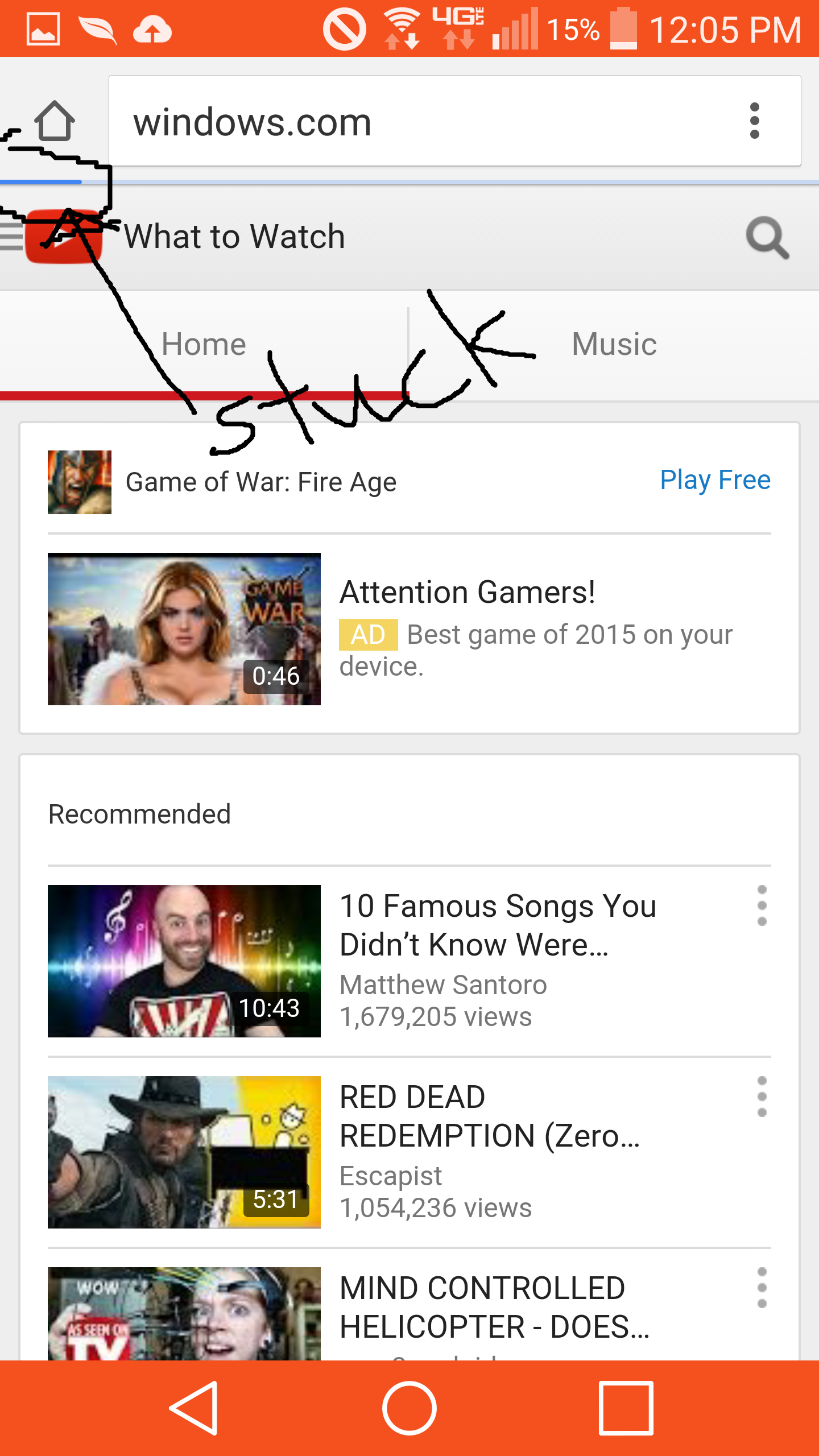
How do I get WiFi usable again on LG G3 with Lollipop?
- Mark as New
- Bookmark
- Subscribe
- Mute
- Subscribe to RSS Feed
- Permalink
- Report Inappropriate Content
How do I get WiFi usable again on LG G3 with Lollipop? I've tried factory reset and it doesn't help. The WiFi works, but its so slow that it will sometimes timeout on the Chrome browser and not even load a page! The problem is not the browser - both Chrome and Dolphin are slow. The websites are not a problem either - the same websites on my computer load perfectly fine. Also, this never happened until I go the Lollipop update. I'm thinking it is really due to this update (a lot of other people maybe have this issue). Has anyone else experienced this issue or figured out how to solve it? Thanks!
- Mark as New
- Bookmark
- Subscribe
- Mute
- Subscribe to RSS Feed
- Permalink
- Report Inappropriate Content
Have you powered your device off/on since retrieving the software update? Do you have 3rd party applications downloaded to your phone?
For more details regarding the recent software update on your device, click http://vz.to1HJ0aDM
LasinaH_VZW
Follow us on Twitter @VZWSupport
If my response answered your question please click the "Correct Answer" button under my response. This ensures others can benefit from our conversation. Thanks in advance for your help with this!!
- Mark as New
- Bookmark
- Subscribe
- Mute
- Subscribe to RSS Feed
- Permalink
- Report Inappropriate Content
The device worked before the update, and lollipop comes out and people on LG G3s all over this forum cannot operate with efficiency like we used to. What do you not understand? Your textbook-responses only serve to infuriate many users like myself who know for a fact this update is the culprit. What would make me happy is a link or an option to roll back to the old version while the kinks are being worked out with Lollipop.
- Mark as New
- Bookmark
- Subscribe
- Mute
- Subscribe to RSS Feed
- Permalink
- Report Inappropriate Content
My response was directed at Verizon for the record lol.
- Mark as New
- Bookmark
- Subscribe
- Mute
- Subscribe to RSS Feed
- Permalink
- Report Inappropriate Content
I understand how you feel. Unfortunately, once the software has been updated we are unable to change it back to the previous software.
In many cases 3rd party applications that have not been updated to work properly with Lollipop, can cause the phone to work twice as hard to run them (even in the background when you're not using them) creating some issues. There may be situations where downloaded application developers do not immediately update their applications to support new versions of the OS. We recommend checking for any app updates in the Google Play store.
You can also try this http://www.verizonwireless.com/support/knowledge-base-156889/ and power cycle the phone.
JohnB_VZW
Follow us on Twitter @VZWSupport
If my response answered your question please click the "Correct Answer" button under my response. This ensures others can benefit from our conversation. Thanks in advance for your help with this!!
- Mark as New
- Bookmark
- Subscribe
- Mute
- Subscribe to RSS Feed
- Permalink
- Report Inappropriate Content
OMG, I am speechless ![]()
Guys after all, we are talking to "machines", all those responses from VZWSupport seem to come automatically... Not from real customers service personnel. Since we "clearly" addressed that we had wiped caches, power cycles thousands times, reset phones/exchanged phones, and problems still persist. BTW "handout" is developed by google so it should not count as a 3rd party app, I don't think. I guess we should stop wasting our time to post questions, they are NOT being read anyway.
- Mark as New
- Bookmark
- Subscribe
- Mute
- Subscribe to RSS Feed
- Permalink
- Report Inappropriate Content
Still can't use Wi-Fi. Been almost a month now.
- Mark as New
- Bookmark
- Subscribe
- Mute
- Subscribe to RSS Feed
- Permalink
- Report Inappropriate Content
I think it will take another 2~3 months before the next system update comes...
- Mark as New
- Bookmark
- Subscribe
- Mute
- Subscribe to RSS Feed
- Permalink
- Report Inappropriate Content
A patch is in the works from Verizon and should be delivered anywhere from 1 - 3 weeks from now. The next major LG update 5.1 is not going to be released for months.
- Mark as New
- Bookmark
- Subscribe
- Mute
- Subscribe to RSS Feed
- Permalink
- Report Inappropriate Content
Is there a link to more information on the impending patch?
I am extremely unhappy my phone is close to useless over WiFi, plus battery drain, plus it gets hot, etc. About to kick Verizon, LG and Google all to the curb unless this gets fixed and soon. I'll stick w my Samsung phone on AT&T with good ol' reliable KitKat.
- Mark as New
- Bookmark
- Subscribe
- Mute
- Subscribe to RSS Feed
- Permalink
- Report Inappropriate Content
I obtained the info from a Verizon developer so no official link exists. I will be checking next week on how the patch is going if it is not released before then. I am not very hopeful though.
- Mark as New
- Bookmark
- Subscribe
- Mute
- Subscribe to RSS Feed
- Permalink
- Report Inappropriate Content
I doubt it (the release of the patch) will be that quick, even if it does, I doubt it will fix the problems.
- Mark as New
- Bookmark
- Subscribe
- Mute
- Subscribe to RSS Feed
- Permalink
- Report Inappropriate Content
Thanks for the quick reply!
> What happens when you try to connect to Wi-Fi?
It connects to Wi-Fi just fine. It has problems loading web pages while on the Wi-Fi. The blue-bar indicating the page loading simply stops about 1/10th of the way for several seconds and sometimes never loads (due to the timeout). Here's an example of me trying to load a website (microsoft.com):

> Do you have other devices connected to that Wi-Fi connection?
Yes, there are three other devices (laptops running Windows) connected to the same Wi-Fi connection, with no problems.
> Have you powered your device off/on since retrieving the software update?
Yes. I've powered off/on and it doesn't help.
> Do you have 3rd party applications downloaded to your phone?
No. I actually did a factory reset after the installation, hoping that would help, but it also did not fix the problem. So as of now I have NO installed applications and the problem persists.
- Mark as New
- Bookmark
- Subscribe
- Mute
- Subscribe to RSS Feed
- Permalink
- Report Inappropriate Content
I have exactly this problem and have talked/chatted for support and tried all of their suggestions but to no avail. Even reset my router, modem.... Now Verizon insisted on send me a certified like new replacement phone. Which I do not think solves the real problem and told them so. My phone is new and should work, but not with the updated software.
Verizon must fix this quickly....wifi/browsers do not work.. tried three browsers. all other devices in the house work fine. You better watch your data use because I found my phone using data even when wifi signal was strong on a known network.
- Mark as New
- Bookmark
- Subscribe
- Mute
- Subscribe to RSS Feed
- Permalink
- Report Inappropriate Content
Have you tried changing the settings on your router. Change the channel and frequency to a different number especially if it is on an auto setting.
- Mark as New
- Bookmark
- Subscribe
- Mute
- Subscribe to RSS Feed
- Permalink
- Report Inappropriate Content
Not the router.....in addition to factory reset, have run phone in safe mode for 24 hours, does not work.
Problems in addition to wifi connectivity and browsers.
battery drain
many apps do not work at all or are slow, freeze, or lag badly
backup and sync do not work 100%....glitches...I lost all settings, passwords, on factory reset even after backup.
and......I am seeing no advantages to the lollipop upgrade?
- Mark as New
- Bookmark
- Subscribe
- Mute
- Subscribe to RSS Feed
- Permalink
- Report Inappropriate Content
I think its unlikely the router. I have tried two different routers at home, both have this problem. Also the problem exists at school (which is a better Wi-Fi system than my home one).
- Mark as New
- Bookmark
- Subscribe
- Mute
- Subscribe to RSS Feed
- Permalink
- Report Inappropriate Content
We hear your need for speed! Place the device in Safe Mode then test the Wi-fi to see if the speeds increase. http://www.verizonwireless.com/support/knowledge-base-112843/ . Keep us posted
Thanks,
PamelaF_VZW
Follow us on Twitter @VZWSupport
If my response answered your question please click the "Correct Answer" button under my response. This ensures others can benefit from our conversation. Thanks in advance for your help with this!!
- Mark as New
- Bookmark
- Subscribe
- Mute
- Subscribe to RSS Feed
- Permalink
- Report Inappropriate Content
Done that and it makes no difference. I continually get a message on my phone: "the wi fi network to which you are connected is not connected to the internet", yet my wifi signal is strong, and under settings it says it is connected.....and from my laptop in front of me at the time, I am surfing the internet....
You need to stop giving a lot of bad advice for this problem. e.g. factory reset, safe mode, bad apps, you even sent me a replacement phone,......and if you look, the internet chat rooms are full of the same issues....unsolved and frustrated. None of those things work!
Verizon Lollipop needs a "patch".......wifi at best lags, 15-30 secs to load a website, or not at all,,,,tried different browsers, reset router, and modem, called Xfinity...reset....It's the software! fix it! and be more transparent and open about the problem instead of sending us on wild goose chases. That just treats your customer like an idiot.
- Mark as New
- Bookmark
- Subscribe
- Mute
- Subscribe to RSS Feed
- Permalink
- Report Inappropriate Content
I absolutely agree, it is NOT the hardware problem, it is the software issue. If I was VZ, I would be holding Google accountable for all this. VZ customer service, please speak out for your customers, we have no counterpart in Google representing us but you do. Talk to your Google counterpart about these problems. Stop sending us useless instructions (such as reset, exchange phones etc), talk to Google pls, get us a working patch
- Mark as New
- Bookmark
- Subscribe
- Mute
- Subscribe to RSS Feed
- Permalink
- Report Inappropriate Content
Agreed! ^^^^^^^^^^^