Incoming calls go straight to answer screen without ringing, touching the phone or connecting

bburns1214
Enthusiast - Level 2


When I am at work, any incoming call goes straight to the in-call screen, looks like the call has been answered but it has not.  This is without the phone ringing, vibrating, swiping to answer, actually not touching the phone at all.  The phone looks like it is on a phone call but the caller just hears rings and eventually goes to voicemail.  I've tried everything, wiping the phone, factory resets, reseating sim card, new sim card, battery pulls, and even new phones.  I'm thinking it has to be some type of interference but not sure how.  I turn off wifi and keep it from searching for networks but that didn't work.  Any help would be greatly appreciated.
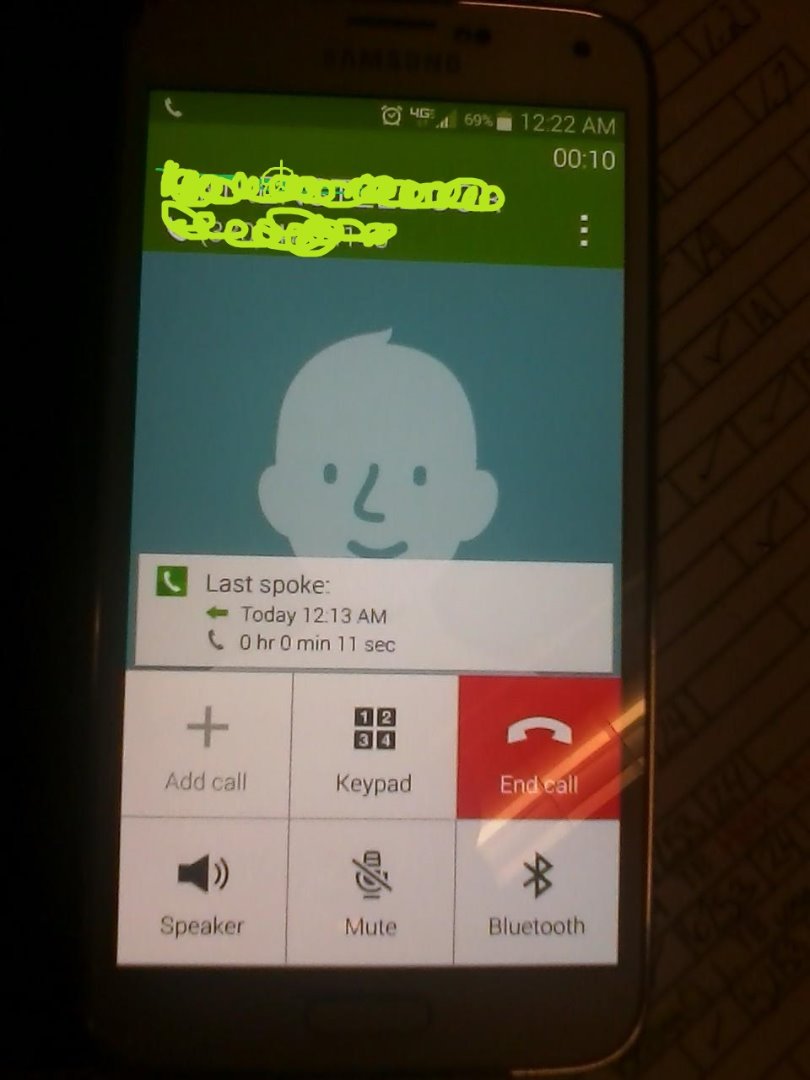
 

1015140022.jpg

Labels (2)
0 Likes
Reply
24 Replies
vzw_customer_support
Community Manager
Community Manager

Lets get to the bottom of this! You mentioned this happens when at work, does this issue happen in all areas or just your work area? It seems like you have done your fair share of troubleshooting. Since this is not a known issue and it is happening with multiple devices, it is possible it is a network issue. Have we filed a network ticket? Also does this happen with all callers?

Share further details so that we can help!

Thank you,

LenaA_VZW
Follow us on Twitter @VZWSupport

0 Likes
Reply
bburns1214
Enthusiast - Level 2

It happens everywhere at work.  I've walked around and called my phone and it still does it.  I've turned WiFi off and that hasn't helped.  It happens with all callers when VoLTE is off.  I've had some luck with calla coming through with VoLTE on but the call quality is terrible.  Can barely understand the person on the other line.  No I have not filed a network ticket, how would I go about doing that?  Another trip to the Verizon store just to be told nothings wrong?

0 Likes
Reply
vzw_customer_support
Community Manager
Community Manager

No need to visit the store, we'll pinpoint the issue and make certain that you can stay in the loop! Before filing a ticket, lets take a closer look. What zip code do you work in? Are you having trouble indoors and outdoors?

AshleyS_VZW
Follow us on Twitter @VZWSupport

0 Likes
Reply
bburns1214
Enthusiast - Level 2

44706 and I am indoors.

0 Likes
Reply
bburns1214
Enthusiast - Level 2

How do I go about filing a ticket?  If VoLTE is turned off, my phone will not ring and goes to the answer screen without connecting.  Turn VoLTE on, it will ring but the calls are so choppy you can not understand anyone. My phone is basically useless.  I don't know what else to do since no one seems to want to help.  I guess I could make a video and hope it goes viral.

0 Likes
Reply
vzw_customer_support
Community Manager
Community Manager

bburns1214,

We can help you with a ticket if necessary. Just a few more questions for you. Does this "frozen" screen happen with every call? Does it only happen in certain locations? Was it the same model phone that you were using when testing with other phones?

SandyS_VZW
Follow us on Twitter @VZWSupport

0 Likes
Reply
bburns1214
Enthusiast - Level 2

It happens with every single call when VoLTE is turned off and I am at work. Works fine when I am at home.  It happens everywhere even in parking lot.  Yes all three phones were Galaxy  S5's and all had the same exact issue.  I do have a Verizon LG cell that works fine in all areas.  I don't like having VoLTE on because the call quality is very choppy for me and the person on the other end.

0 Likes
Reply
vzw_customer_support
Community Manager
Community Manager

bburns1214 we'll pinpoint the issue! Is the LG device, that works in all areas, using Advanced Calling too?

AshleyS_VZW
Follow us on Twitter @VZWSupport

0 Likes
Reply
bburns1214
Enthusiast - Level 2

No it is not.

0 Likes
Reply
vzw_customer_support
Community Manager
Community Manager

Thank you bburns1214. Let's go to Settings>More Networks>Mobile Networks>Network Mode>LTE/CDMA with VOLTE off.

AdaS_VZW
Follow us on Twitter at @VZWSupport 

0 Likes
Reply
bburns1214
Enthusiast - Level 2

LTE/CDMA and VoLTE off phone does not ring.

0 Likes
Reply
vzw_customer_support
Community Manager
Community Manager

I appreciate you taking these steps to troubleshoot, bburns. Please respond to my Direct Message and we can work to get our network team involved.


Thank you,

YaleK_VZW

Follow us on Twitter @VZWsupport

0 Likes
Reply
bburns1214
Enthusiast - Level 2

Could someone check and see if this is still being worked on?  I had a network ticket open and was told the product development team needed to work with Samsung to resolve the problem?  I have had a phone that won't work on this network for over 3 months and can't do anything about it.

0 Likes
Reply
vzw_customer_support
Community Manager
Community Manager

We would love to check on your trouble-ticket bburns1214. We will need to know your ticket number via private message here, on facebook, twitter, chat, or by phone. We look forward to finding a resolution for you.

Kinquana_VZW
Follow us on Twitter @vzwsupport

0 Likes
Reply
bburns1214
Enthusiast - Level 2

Can you add me so I can send a message?

0 Likes
Reply
vzw_customer_support
Community Manager
Community Manager

Bburns1214,

Sorry about that! I've sent you a direct message and look forward to assisting you with this.

SarahO_VZW
Follow us on Twitter @VZWSupport

0 Likes
Reply

I am haVing this same problem how can i fix it?

0 Likes
Reply
vzw_customer_support
Community Manager
Community Manager

KaitlinMarie,

Thank you so much for bringing this to our attention. We want to make sure that everything is working with no issues. I would like for you to try one step for me. Can you please go into Settings, Application, Application Manager, Slide the screen to the left until you get to the ALL section, scroll down to "Phone", then try Clear Data, Clear  Cache, and Force Stop. Then power cycle your device. Once the phone comes back on can you please re-test.

KevinR_VZW
Follow us on Twitter @VZWSupport 

0 Likes
Reply

I will do that. I found a form online that said i needed to go on to my

online account. go to add / change features and add advanced calling 1.0.

then reboot my phone, then go to setting more networks, mobile networks and

turn on or off the VoLTE call. I did this and everything is working fine

for now Smiley Happy

Thank you

On Wed, Dec 17, 2014 at 8:27 AM, Verizon Wireless Customer Support <

0 Likes
Reply
Ann154
Community Leader
Community Leader

Bburns1214,

You were so good about hiding the phone number and other information in your attached image, but do you realize that you are broadcasting your email address to the entire world on this public forum?

I'm most definitely NOT a VZW employee. If a post answered your question, please mark it as the answer.

0 Likes
Reply

