The pedometer stopped working on my S5

bobtongue
Enthusiast - Level 3

The pedometer stopped working on my S5. Also I am having intermittent problems with screen rotation. If I reboot, the pedometer counts steps to about 35 and then stops. I have tried a factory reset, but still no change. Has anyone else seen this problem, and if so how did you fix it? I have installed all updates and upgraded to Lollipop. I am thinking that I may have to use the warranty on the phone, but I am hoping someone has a fix.

Labels (2)
0 Likes
Reply
1 Solution
GalaxyClass
Master - Level 1

As I said you have made the correct moves to solve this and I feel as I stated,  hardware issue to consider and interface inpur in the circuit. Do you have warranty or insurance to cover a replacement as this would be your move now.     

View solution in original post

0 Likes
Reply
24 Replies
vzw_customer_support
Community Manager
Community Manager

That's an odd issue, bobtongue. We definitely want you to enjoy these features on your phone, so we'll get to the bottom of it. Thank you for taking some steps to troubleshoot the app. Apps with an issue do not warranty a replacement, but we'll address that a bit more once we try it all. Please reset the app, from Settings>Applications>Application Manager>All. Force Stop and clear data.

AdaS_VZW
Follow us on Twitter at @VZWSupport 

bobtongue
Enthusiast - Level 3

OK, I did this again. (I have done it many times before). The result is the same. After rebooting, the pedometer counted my first 51 steps. Then it stopped. no joy.

0 Likes
Reply
vzw_customer_support
Community Manager
Community Manager

bobtongue,

Thanks for continuing to troubleshoot this issue with ourselves and the community.  Have you been able to verify if the accelerometer is still functioning properly at this point?


TrevorC_VZW

Follow us on Twitter @VZWSupport

0 Likes
Reply
bobtongue
Enthusiast - Level 3

Thanks Stef7

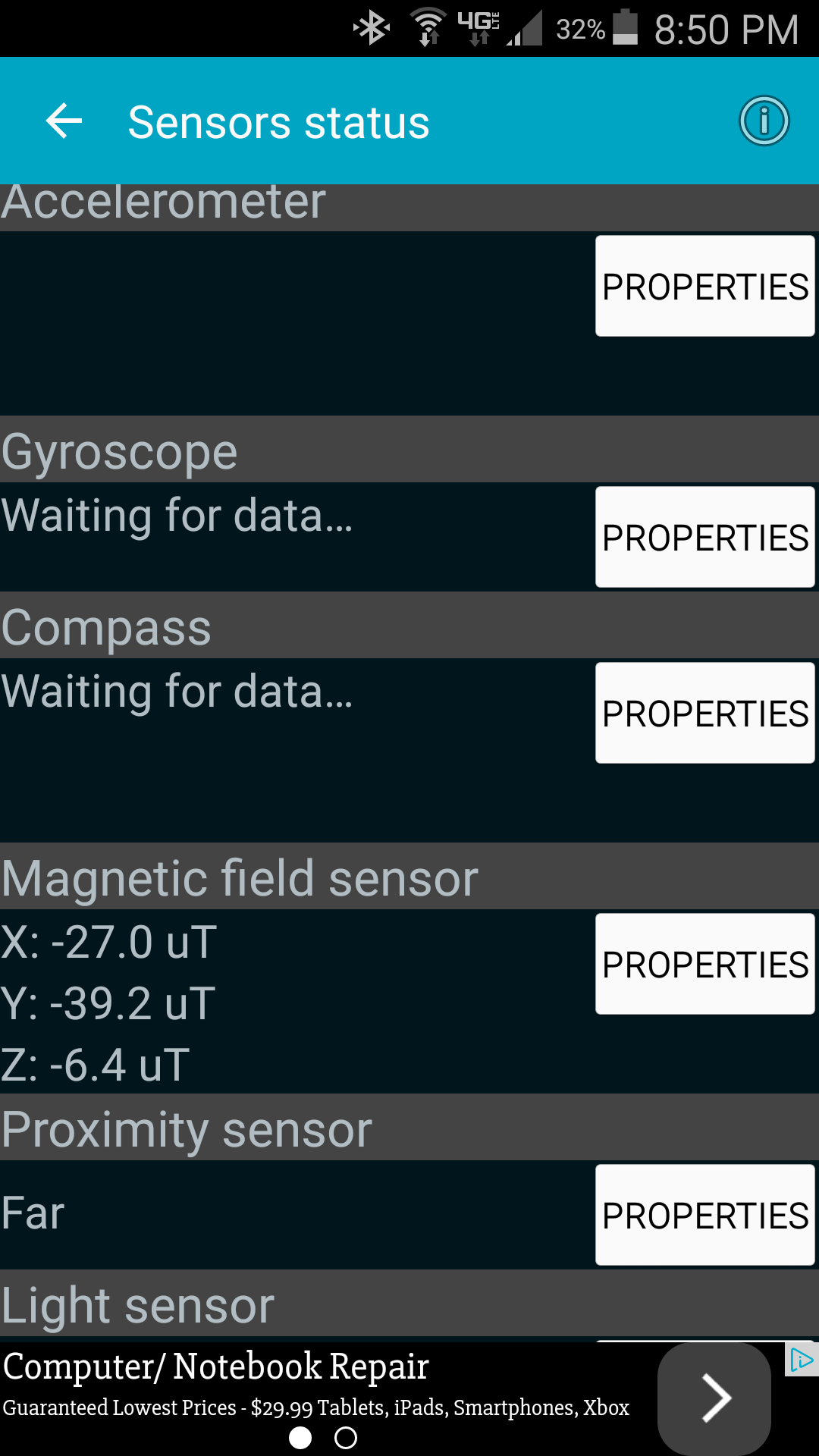
This is what I see

Looks like not much is functioning properly, am I wrong?

Screenshot_2015-02-09-20-50-50.png

0 Likes
Reply
bobtongue
Enthusiast - Level 3

See photo I uploaded for hardware status, Thanks

0 Likes
Reply
stef7
Master - Level 2

Wow, so does GPS wok?

Try downloading a program like GPS toolkit. Go into the menu and calibrate the pitch and roll if you can. Go into manage GPS state and select reset and download AGPS data.if outside, can the phone locate your position?

Its like your app software can't speak to the device hardware.

Have you backed up important content and done an FDR?

0 Likes
Reply
stef7
Master - Level 2

Sorry, another FDR.

0 Likes
Reply
bobtongue
Enthusiast - Level 3

OK, I downloaded GPS toolkit and went to calibrate pitch and roll. It said it was calibrated but it only took a millisecond. I reset gps and downladed data. The GPS seems to be working fine. Pitch and roll says zeros across the board. Here is a screen shot. These tools are new to me and so I don't really know what I am supposed to see. But all zeros doesn't usually mean good things.

Screenshot_2015-02-10-07-52-32.png

0 Likes
Reply
bobtongue
Enthusiast - Level 3

The last FDR I did was on Sunday, I can do another if you think it will help. Its a P in the A, but I have everything backed up.

0 Likes
Reply
stef7
Master - Level 2

First, yes, in general, zeros or nothing from the sensors are never good. My LG G2 on a flat surface will show 0 for roll / pitch and accel. How about if you pick up the phone? I'd expect some noise / variation in the measurements, but as you roll it or pitch it, or jerk it forward, those numbers need to change.

I thought, maybe if you calibrated Roll and Pitch with this tool, and energized GPS, it would "wake things up" in the interface between the OS and the drivers/firmware for the sensors.

OK, how about power-cycling the device?

Next, if still not working, how about following the instructions for a low-level cache clear (if you haven't done one of those yet).

Lastly, I know it's a PITA, but if I were in your shoes, I suppose I'd be trying one more FDR. What else have you got to try?

Interestingly, the compass and GPS seem to work to find your location even without your accelerometers and pitch, roll and yaw. But I wonder if it would continue to work well when using GoogleNav in your car... If it doesn't, I would expect other S5 owners to be upping the complaints.

bobtongue
Enthusiast - Level 3

Unfortunately, the numbers do not change when I move it. I removed the battery and power cycle d. That wanted it up for a very short time. Then the tools all show reasons. It lasts less than 10 minutes and then goes brain dead again. I already tried the low level cache wipe, it didn't work. It will come back to life after power cycle - sometimes, but it never lasts for mute than a few minutes. Fwiw, this started happening about 2 weeks ago. Long before the lollipop upgrade. Just started happening out off the blue.

0 Likes
Reply
bobtongue
Enthusiast - Level 3

Let me clean up the autospell errors, Sorry about that.

Unfortunately, the numbers do not change when I move it. I removed the battery and power cycled. That woke it up for a very short time. Then the tools all show numbers. It lasts less than 10 minutes and then goes brain dead again. I already tried the low level cache wipe, it didn't work. It will come back to life after power cycle - sometimes, but it never lasts for more than a few minutes. FWIW, this started happening about 2 weeks ago. Long before the lollipop upgrade. Just started happening out off the blue.


I have googled this and looked for other solutions, I can't find anyone else having the same problem, this would lead me to believe that the hardware itself is failing.

0 Likes
Reply
GalaxyClass
Master - Level 1

As I said you have made the correct moves to solve this and I feel as I stated,  hardware issue to consider and interface inpur in the circuit. Do you have warranty or insurance to cover a replacement as this would be your move now.     

0 Likes
Reply
bobtongue
Enthusiast - Level 3

I have insurance, but I don't know if its an insurance issue or warranty. I have only had the phone since last May.

bobtongue
Enthusiast - Level 3

I called Verizon and the woman on the phone was very pleasant and accommodating. They are sending me a new replacement phone overnight. Thanks for all of the help, when I informed her that I had been troubleshooting on the support website it was a slam dunk. Few quick questions and new phone. Thanks again

stef7
Master - Level 2

Yeah, it was sounding like the HW went amuk. I'm hoping the replacement poses no issues. Let us know!

0 Likes
Reply
bobtongue
Enthusiast - Level 3

New phone came, restored apps and info, everything is working fine now. Pedo is counting steps joyfully and the world is a happy place. Thanks again for the help.

GalaxyClass
Master - Level 1

Glad I could help you and I wish you the best with your replacement phone.  Galaxy Class

0 Likes
Reply
stef7
Master - Level 2

You might want to download an app like Phone Tester or other and see if your Accelerometer sensor(s) are "stuck".

0 Likes
Reply
bobtongue
Enthusiast - Level 3

I downloaded phone tester. Checked the accelerometer. I really don't know what I am looking at. It doesn't give me any information unless I press properties. Properties tells me a few specs on the accelerometer but it doesn't tell me whether its working or not.

0 Likes
Reply