How do I configure Thunderbird to receive and send verizon.net email?
gef2014
In case someone stumbles across this in August, 2021, who has a verizon.net account.
You have to log into mail.aol.com first.
Then you will need to 'generate' a new password for Thunderbird (or whatever other third-party app you are using) by following these steps:
https://help.aol.com/articles/Create-and-manage-app-password
1. Sign in and go to the AOL Account security page.2. Click Generate app password or Manage app passwords.3. Select your app from the drop down menu and click Generate.4. Follow the instructions below the password.- Be sure to enter the password into your app without any spaces.5. Click Done.6. Use this app password and your email address to sign in to your email app.
You should get to a screen like this:
Copy and paste that password into your account settings, incoming and outgoing (Thunderbird will ask the first time you try and send out an email).
Pain in the butt but it works with both POP3 incoming and smtp outgoing settings, same port numbers as before.
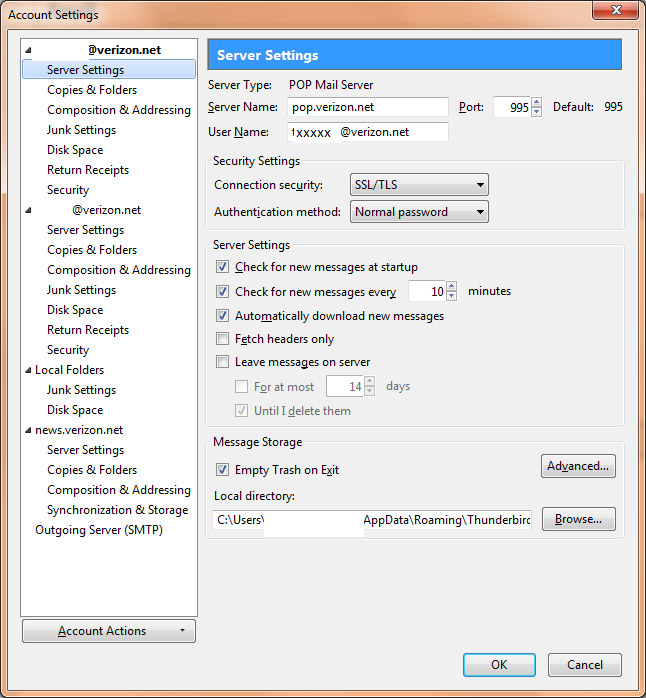
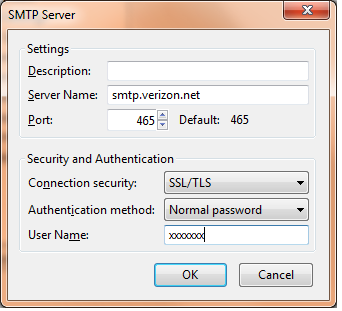
For the sake of example, we are going to pretend that we are setting up fictional account "fakeacct@verizon.net" and the password for logging into that account in webmail is "fakepassword" - Again, this is a fictitious account for the sake of an example.The settings for using Verizon's servers would be:Incoming Server: pop.verizon.netServer Requires Authentication: YesUsername: fakeacctPassword: fakepasswordRequires a Secure Connection (SSL): YesPort: 995Outgoing Server: smtp.verizon.netServer Requires Authentication: Yes (You can set it to use the same settings as incoming, or manually enter the username and password.)Requires a Secure Connection (SSL): YesPort: 465If you are given the option anywhere for Secure Password Authentication (SPA), set it to No or NormalThese settings should work unless you have a Verizon/Yahoo account, in which case the server names are: incoming.yahoo.verizon.net -and- outgoing.yahoo.verizon.netIf all of that is set up and it's still not working, your best bet is to provide a screenshot of your settings (with personal information blocked/removed) and any errors you are getting.
Thanks! but where do I input these settings? please describe.
Just saw this info today, and can verify it is accurate.
However, as a long time Thunderbird user, I caution Verizon.net customers against planning on establishing a reliable Thunderbird e-mail system using Verizon.net.
My Verizon web mail (Yahoo) works reliably. Thunderbird (which I greatly prefer) stumbles intermittently for prolonged periods and cannot access the SMTP (outgoing) server (which is Yahoo mail). The result is one can receive mail on TBird but cannot send mail.
The problem typically resolves with 24 hours with no changes made on my end.
Hours spent communicating with Verizon support have failed to resolve the problem.
Since 9/25 evening I have been unable to send e-mail using Verizon.net on TBird. I expect that by tommorrow, it will function again.
Last outage was in August.
If you can personally tolerate such disruptions go for Thunderbird. I love it.
As this thread is now over two years old, it will be locked in order to keep discussions current. If you have the same or a similar question/issue we invite you to start a new thread on the topic.



![Photo of [Deleted User]](https://we.vanillicon.com/v2/ed53a0ea8d4610e2e903eda78cf49f29.svg)