Since last Friday (2023-02-03), I have been having problems with my Verizon Fios CR1000A router. The 2.4Ghz wifi band just stops working, all the devices get disconnected and the router stops emitting in that frequency. The 5Ghz band keeps working just fine though.
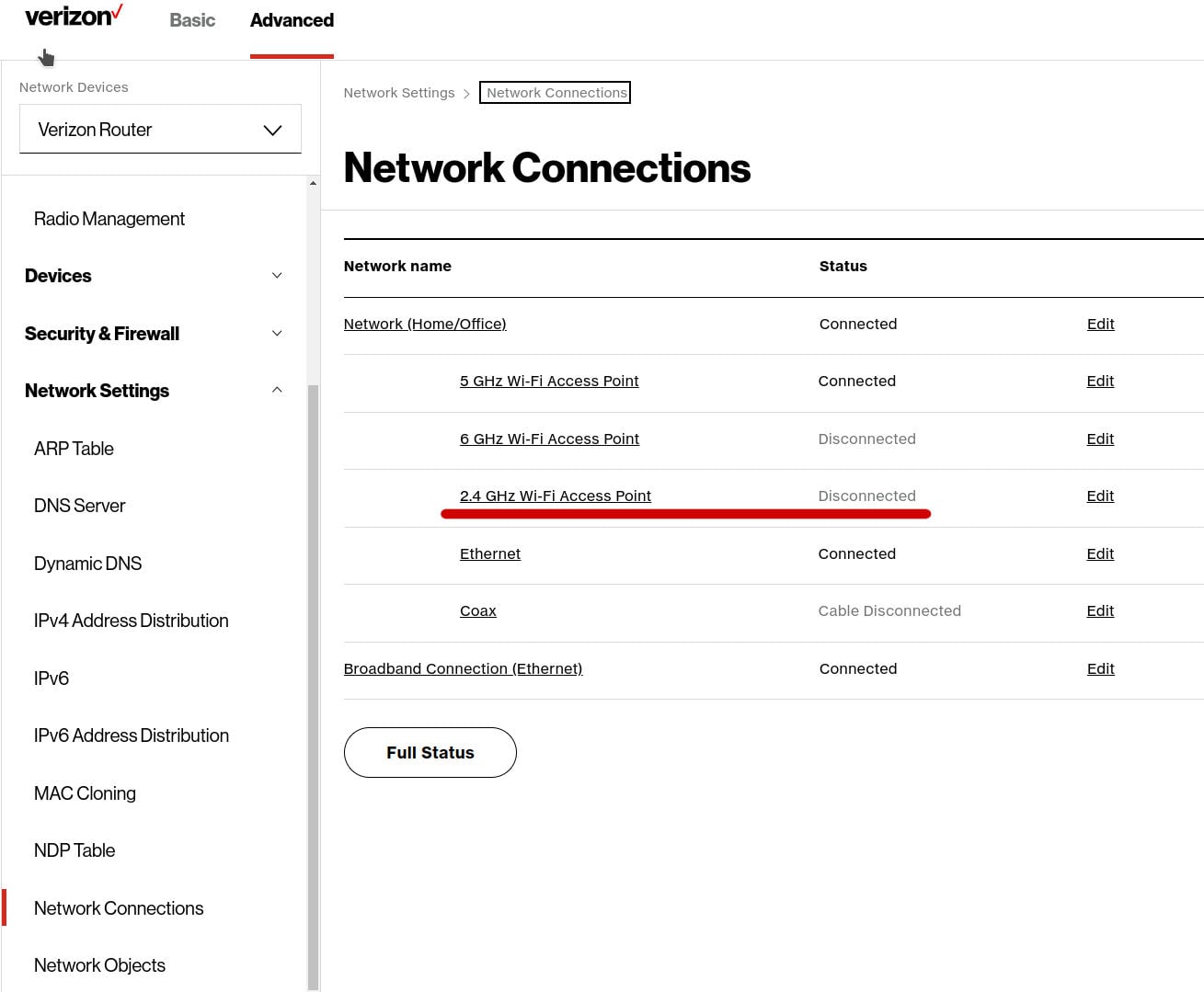
Note: in the picture the 2.4 band appears as Disconnected, despite being enabled. However, if a band does not have any devices connected to it, it will also appear as "disconnected" (I tried that by disconnecting everything from the 5Ghz band, and that one also appeared as "disconnected") so it is possible that it says "disconnected" while the radio is enabled, but this is not what it's actually happening for the 2.4 band.
The only way to make the 2.4Ghz work again is by completely restarting the router, but it will only work from a few minutes to a few hours. This is an issue because many IoT devices only work on the 2.4Ghz band. I've had this router for several months, and this never happened before.
Things that I have tried so far:
- Restarting the router. This makes the 2.4 band work for a few minutes or even a few hours.
- Changing the wifi channel (by default it was on auto). Doesn't have any effect.
- Disabling and re-enabling the 2.4 band. Does nothing unless I restart the router.
- Disabling SON (Self-organized network). No effect.
- Reset everything to factory defaults. No effect either.
- Setting different SSID for 2.4 and 5.0Ghz bands. No effect.
I I talked with a Verizon technician and sent me a new router, but the problem reappears immediately, so that rules out a hardware issue.
In the router log, when the disconnection happens, I can see something like this, which seems to be each device connected to that band losing connectivity:
2023 Feb 8 01:26:18 hostapd info [WIFI.6][ADV]Connection Event: BSS=ath1, ACTION=Connectivity, SA=78:67:0e:af:xx:xx, DA=d8:1f:12:38:2exx, STA is disconnected
2023 Feb 8 01:26:17 hostapd info [WIFI.6][ADV]Connection Event: BSS=ath1, ACTION=Connectivity, SA=78:67:0e:af:xx:xx, DA=66:19:a0:e9:b8:xx, STA is disconnected
2023 Feb 8 01:26:16 hostapd info [WIFI.6][ADV]Connection Event: BSS=ath1, ACTION=Connectivity, SA=78:67:0e:af:xx:xx, DA=86:05:ba:c2:48:xx, STA is disconnected
2023 Feb 8 01:xx:xx hostapd info [WIFI.6][ADV]Connection Event: BSS=ath1, ACTION=Connectivity, SA=78:67:0e:af:xx:xx, DA=48:78:5e:17:d8:xx, STA is disconnected
2023 Feb 8 01:26:16 hostapd info [WIFI.6][ADV]Connection Event: BSS=ath1, ACTION=Connectivity, SA=78:67:0e:af:xx:xx, DA=b8:27:eb:5e:f1:xx, STA is disconnected
2023 Feb 8 01:26:16 hostapd info [WIFI.6][ADV]Connection Event: BSS=ath1, ACTION=Connectivity, SA=78:67:0e:af:xx:xx DA=b4:b0:24:55:29:xx, STA is disconnected
2023 Feb 8 01:26:16 hostapd info [WIFI.6][ADV]Connection Event: BSS=ath1, ACTION=Connectivity, SA=78:67:0e:af:xx:xx, DA=b4:b0:24:55:40:xx, STA is disconnected
2023 Feb 8 01:26:16 hostapd info [WIFI.6][ADV]Connection Event: BSS=ath1, ACTION=Connectivity, SA=78:67:0e:af:xx:xx DA=c8:c9:a3:92:c7:xx, STA is disconnected
2023 Feb 8 01:26:16 hostapd info [WIFI.6][ADV]Connection Event: BSS=ath1, ACTION=Connectivity, SA=78:67:0e:af:xx:xx, DA=48:3f:da:c2:93:xx, STA is disconnected
2023 Feb 8 01:26:15 hostapd info [WIFI.6][ADV]Connection Event: BSS=ath1, ACTION=Connectivity, SA=78:67:0e:af:xx:xx, DA=48:3f:da:c2:85:xx, STA is disconnected
2023 Feb 8 01:26:15 hostapd info [WIFI.6][ADV]Connection Event: BSS=ath1, ACTION=Connectivity, SA=78:67:0e:af:xx:xx, DA=1c:3b:f3:2d:8d:xx STA is disconnected
The wifi spectrum where I live is very saturated, but that hasn't been a problem for over a year. I could understand that some devices lost connectivity or had low speed because of that, but not that the router just disables the 2.4 band and never reconnects again.
I have not made any changes in my network in the last few weeks. No new devices or anything. Maybe there's been a firmware update last week that caused this issue ?
For the moment, as a workaround, I am using a (very) old router I had lying around and set it up as a wireless access point for the 2.4 band, but I'd rather use the wifi from Verizon's router.
I just wanted to know if I'm alone in this or there's more people affected by this issue. Currently I'm out of ideas and if the problem doesn't resolve I'll just buy a third-party router.




