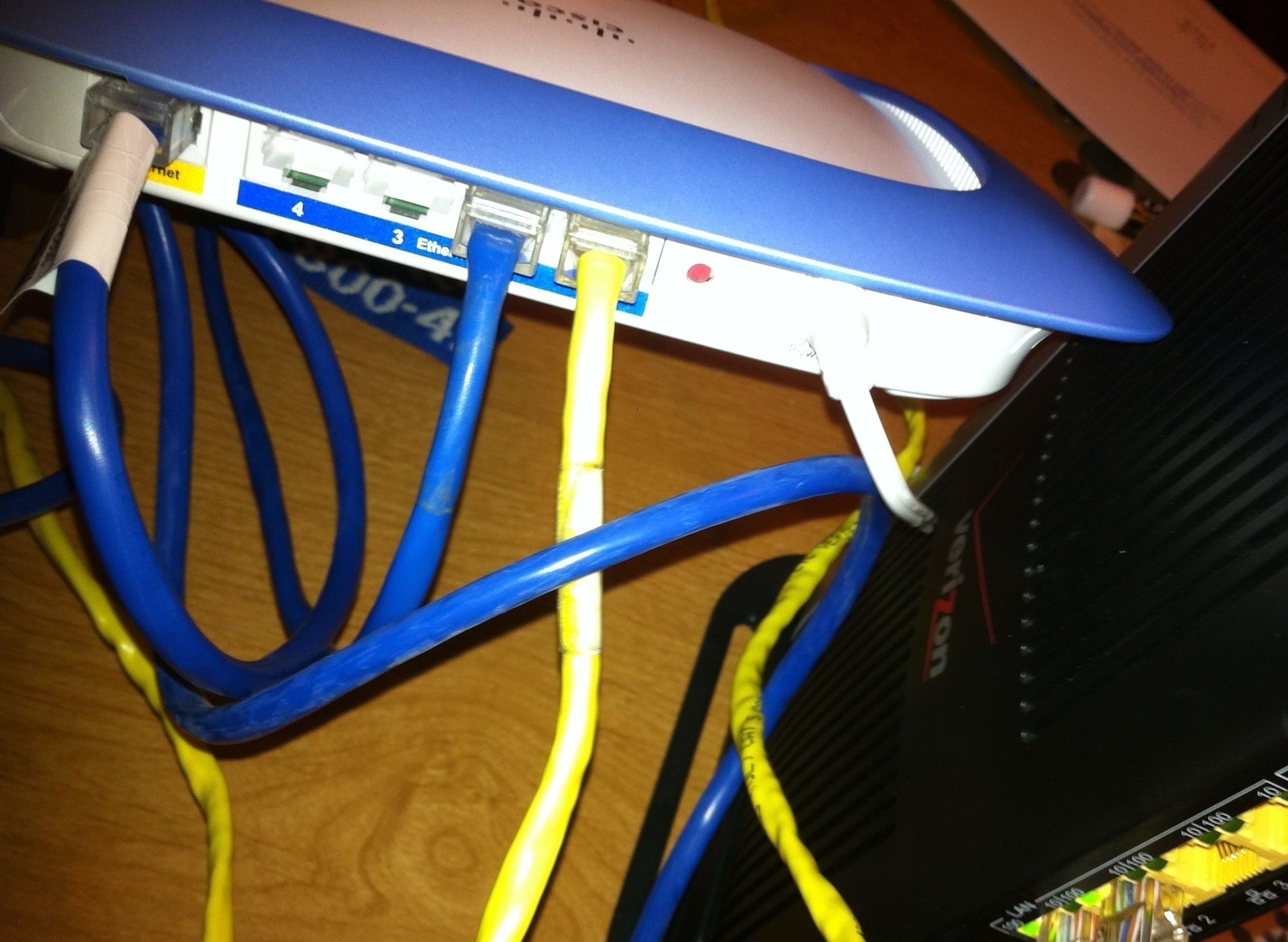
Okay so just as the title says how do i use a second router? I got a cisco valet router... I don't know how to use it because the verizon router/modem is wierd i know how to use a router if i only had a modem but fios gives router/modem so how can i use my 2nd router? The current verizon fios router/modem is b/g mode and i wanna change to b/g/n so i can get a better speed from my internet... SO how can i use my 2nd router? I tried this http://www.dslreports.com/faq/verizonfios/3.0_Networking#12506 but i don't get it can someone guide me better or make a video explaination on how to use a 2nd router? I have it connected with see as in pic i connect from my router Internet port to wan port and the ethernet lan port to the ethernet lan port on verizon fios and no work please help...
I don't believe I'm quite getting how you've connected everything. From the best I can tell, you've got a network cable connecting your Valet router's LAN port to the Valet router's Internet or WAN Port, which would be a NAT Loop in the network, and from there, the LAN Port on the Valet would be connected to the ActionTec router. First impressions of course aren't always reliable, so I will assume at this point, you did not create a loop. From what you said though, I'm running on the assumption that you meant WAN Port on the ONT, to the Internet port on your router. One cable goes to a PC, and another goes to the ActionTec router's LAN port.
Which router are you wanting to make your Primary router? The Verizon-supplied ActionTec router, making your Valet router into an Access Point and switch, or do you want to make the Valet the Primary router and simply set the ActionTec up as a MoCa Bridge for your Set Top Boxes if you have FiOS TV, and as another access point for Wireless G devices and an Ethernet switch?
How is your ActionTec router currently connected to the ONT Verizon installed? Is it being done via a Coaxial cable, or is there an Ethernet cable coming from the ONT to your ActionTec or Cisco/Valet router?
If you can give us this information, we can give you the info relavent to what you want to accomplish from that FAQ at DSLReports. There's 8 or so different combinations to set things up so we have to settle with one.
I want to make the CISCO a primary router... I don't know what MoCa bridge means i don't have tv or home phone... I just use my cell phone(smart phone) and netflix or hulu+ for tv. There is a coaxial cable from my router to my wall like a tv wire. Do i have to connect a ethernet router to my ONT box? I don't get what to do...I just want to use the CISCO router i tried enabling lan on the verizon router page but that doesn't help I have a wire going from my WAN Ethernet port and Lane Ethernet Port to the Internet Port on my router and the Lan port on my router so 2 wires is on it. Any help? I just don't get FIOS and how to setup a router with it...Also i disabled the wifi on the verizon router and still my valet router isn't working... WIFI part it doesn't seem to get the internet ip address and i don't know how to make it get it...
I am going to get another router NETGEAR N300 Wireless Router
http://www.walmart.com/ip/Netgear-WNR2000-Wireless-N-Router/10928683
so can you or other people help me connect another router please
OK, so with this, we have a few options. You appear to have a MoCa connection to the ONT, hence the coaxial cable being present.
1: The ActionTec can be bridged to the Valet router. This will not require any additional cabling, however it will require a small amount of work to have working. You will also require the ActionTec still in the mix, even though it will not be acting as a router anymore with this configuration.
Visit http://www.dslreports.com/faq/16077 and look at Option 4. There is a thread linked that will allow you to set up the ActionTec as just a MoCa bridge, and will pass the Public IP to your router. You will, in order for this to work once the ActionTec is bridged, need to connect the cable from your Valet router's Internet port, to the ActionTec's LAN port and nothing else goes to the ActionTec. From this point, your Valet should run as your primary and everything should connect through your Valet. If you are adding another router, a Netgear N300, you should perform the LAN to LAN setup, which we will talk about once you've got the Valet working correctly. LAN to LAN configs require a custom setup, so do not set up the Netgear for now.
2: This is my preferred method, which would be to run an Ethernet cable to the ONT. Option 6 in the FAQ. This will require spaking to Verizon to have them move your ONT to Ethernet, but once they do this, you can disconnect the Coaxial Cable from your ActionTec router, and plug in your CAT5/CAT6 cable from the ONT to the ActionTec's Internet/WAN port. Use the ActionTec to ensure everything is working after the switchover, and once off the phone, log into the ActionTec, perform a DHCP Release, and then prompty power off the ActionTec. Once this is done, plug the CAT6 cable into your Valet router's Internet port. You should from this point, be able to connect to the Cisco, and if the DHCP Lease was broken successfully, the Cisco should begin serving up your Internet connection. If it does not, leave the Cisco powered off for a few hours to break the DHCP lease, and then power it up. If the Valet does not work, still, give the Valet a factory reset and set up this router again, with the Ethernet cable from the ONT connected to it.
I would just take a good luck at the FAQ linked above again, and see what would work the best. Easiest thing to do is to get the ONT moved to Ethernet, which allows you to eliminate the ActionTec unless you need it in the future for TV service, and also allows you to use any router with ease.
Once the Valet is up and running and holds your Public IP address from Verizon (use http://whatismyip.com/ to determine this) , and also serves up IPs to devices on your network, post back and we can help you set up the Netgear. If you have any issues while setting this up, fall back to the ActionTec. It's factory reset will work without configuration needed, regardless of you being on Coax or Ethernet.
Yes i tired that but that makes my connection not work... Can you please make a video so i can understand it. I had to call verizon back to get my internet up again.
I would if I could. I'm stuck on DSL, and the nearest FiOS connection to me until Verizon finishes up with their skeleton build out where I am is at least two miles away. Someone here may be able to explain it better than I.
How long have you had FiOS for? If you've had it since it literally came out, you may be on PPPoE rather than DHCP. If on DHCP, it should be a matter of completing the bridge correctly, and ensuring the Valet is able to actually work as a router. This was why I stated to reset both routers if bridging should it not work, and try it again. With the bridging method, you are only calling Verizon to break the DHCP lease if you do not want to wait a few hours. If you are doing the Ethernet from ONT right to router method, Verizon only needed to switch you to Ethernet if they did not already, and break your DHCP lease if you did not wait a few hours.
You could also close the ActionTec's MAC address in the Valet to see if that works and allows it to pull an IP. Log into the Valet at it's default gateway IP address and locate the clone MAC Address option. Use the address displayed from the ActionTec's MoCa WAN (System Monitoring > Advanced Monitors > Advanced LAN Statistics) if you are on Coax to the ONT, or use the ActionTec's Internet Ethernet MAC address if you are Ethernet right to the ONT and the ActionTec is using that connection.
Either way, without knowing how the Valet was configured, I can only suggest resetting it, not running a setup wizard, and trying the bridging options again. If the Valets are like Linksys routers, you can plug them in and they'll work from the get go if it grabs a DHCP address. That's our goal.
Umm i have the netgear N300 wirless router now i took back cisco but still same problem can't get the router to work!!!And yes i did press clone mac of this computer and it still doesn't work... I don't really know how to do it...and "anti-Phish i done step 4 but i can't do step 6 because i don't have a long enough ethernet wire anyways i don't want a wiring running across my house atleast i could hide it but don't know how...
Are you willing to do some fishing of cabling through the walls? If you purchase a length of unterminated CAT5e cabling that meets your length requirements (they go for like $15-25 for a spool that is not 1,000ft long), you can wire one end of the cable to a wall jack, such as this: LINK , and from that point, you can have the other end of the cable terminate into another jack near the ONT if it's indoors, or you can use a crimping tool to add a connector on the other end of the cable. This takes some time, naturally, but it looks the best. Verizon can do this for you, for a fee, or you can have someone you know or trust come in and perform the wiring and connections for you. Once you do that and confirm the cable has been correctly done and ran, you should be able to ask for the ONT to be switched to Ethernet, connect your router to the wall jack, connect the CAT5 cable to the ONT, and you should pull an IP from that point.
To make an Ethernet cable to terminate it to a jack or a connector, you can use this guide: http://www.swhowto.com/CAT5_Ch1.htm (see bottom of page for a link to wiring up a jack)
The only way to stay on Coax and avoid the running of wire would be to use a bridge via the ActionTec. MoCa bridges available on the market do not support MoCA WAN, so you cannot purchase a replacement for Verizon-supplied ActionTecs or Westells. Hence, either Bridge, Actiontec as Primary, or run CAT5e.
Away from all of this, you will just have to consider making the best of use with what you've got. Place your router near the ONT (if it's not outside) in a mountable or secure and safe spot, connect it using an available Ethernet cable to the ONT's Ethernet jack, and from there, use Powerline adapters to get Wired connectivity to your devices that use an Ethernet connection, in addition to setting up the ActionTec as a MoCa bridge/Access Point/Switch, and use MoCa to deliver data to a room with a Coaxial Cable running to it, and a MoCa bridge on the other end.
OMG to hard can't i just do it simple some way... I really don't like the fios router... I was fine with the verizon DSL modem but not with the verizon fios modem/router. I hate verizon fios for that because i can't use my router that i bought -.- Sucks and i don't know how to do the things you said can't i just take out the coaxal connector out of wall and replace with ethernet face plate or whatever you call it... How hard is it to do what you said bout the ethernet face plate? Do i just go around until the ethernet wires go out? Please tell me i wanna upgrade my router really badly
If you really wish to remove the Coax connection, you can simply take the wall jack off the wall, disconnect the coax cable from the back of the connection, and from there, tape (securely!) your UNTERMINATED (meaning just wire, no connector on the end of it) CAT5e cable to the end of the Coax cable. If it's a first floor run, you can just go to the basement of your home and pull down on the coax cable gently which will bring the CAT5e cable down with it. Second floor pulls are much more risky and prone to screwing up. From there, it's a matter of wiring things up. There's a technique to it, but it's pretty easy to do. The site I linked to above tells you how to do it.
Like I said though, if you're not comfortable with doing the wiring, you can get someone out to do it for you. I would prefer to leave the Coaxiable cable in place for the future, if at all possible. They do sell wall jacks that take both RJ45 cables (Ethernet) and Coaxial cables.
Oh they do can you give me the link for both the coaxil and ethernet port? Mostly the one in stores i don't buy stuff online
Do you have FIOS-TV?
If so, you can't get rid of the Actiontec. It's needed to provide internet connectivity for the STBS.
Combination coax/RJ45 wall plates can be found at Radio Shack, Home Depot and Loews in both modular and preassembled versions.
BTW, the Actiontec is a MOCA capable router, not a modem. FIOS does not use modems.
Nope i don't have fios tv as said before... Anyways I got the router to work but the wifi didn't work... So confusing and i spend 2 hours on tech support with netgear... and 5 hours yesterday and they couldn't get my internet up so i did it myself i got it up myself but i can't get the wifi to work i see the SSID in my network list but it won't let me join...the lan internet on the router works. I will try to find a long enough cable to go to the box outside
{word filter avoidance} YES!!!! I GOT IT TO WORK FINALLY!!!!! I didn't need to connect ethernet wire to the verizon FIOS Router... I am using coaX and my 2nd router is working as it should be!!! And now i am getting my full speed of 25/25 wireless!!!!! HAPPY DAY !!! HAHA I did it if you want to know how i did it i will show how i plugged in my router and my verizon router. I also disabled the verizon wifi feature on the Verizon router... Okay here is the pic of the ports connected and that i am online...SO Happy i don't have to use the verizon wifi : ) and now i get full speed wohoo and i didn't even had to change to ethernet port for the verizon router 🙂
HAHAHAHAAHAHAHAHAH VERIZON ROUTER GOT OWNED BY MY NEW ROUTER!!!!AND THE BEST PART IS I FIGURED OUT MYSELF WITHOUT KNOWING ANYTHING!!!!! 🙂 I am so proud of myself
I have the Rev. I Actiontec which is wireless N. But still, with it I could only achieve the typical speed you'd get from a wireless g router. I hooked up an Asus router to use its wireless instead of the Actiontech's and get the full provisioned speed.
The Actiontec sux even if it is the wireless N version.
Ah I was bout to buy it you sure you don't get full speed, that is strange.
Verizon router is only 2.4 frequencies.
Typical N now supports 2.4 and 5 frequencies.
Really want wireless speed consider 802.11AC wireless routers and new 802.11AC adapters.
Guess I will just stick with my netgear router. But I don't really want 2 routers. I wish actiontec would make their router better for consumer.