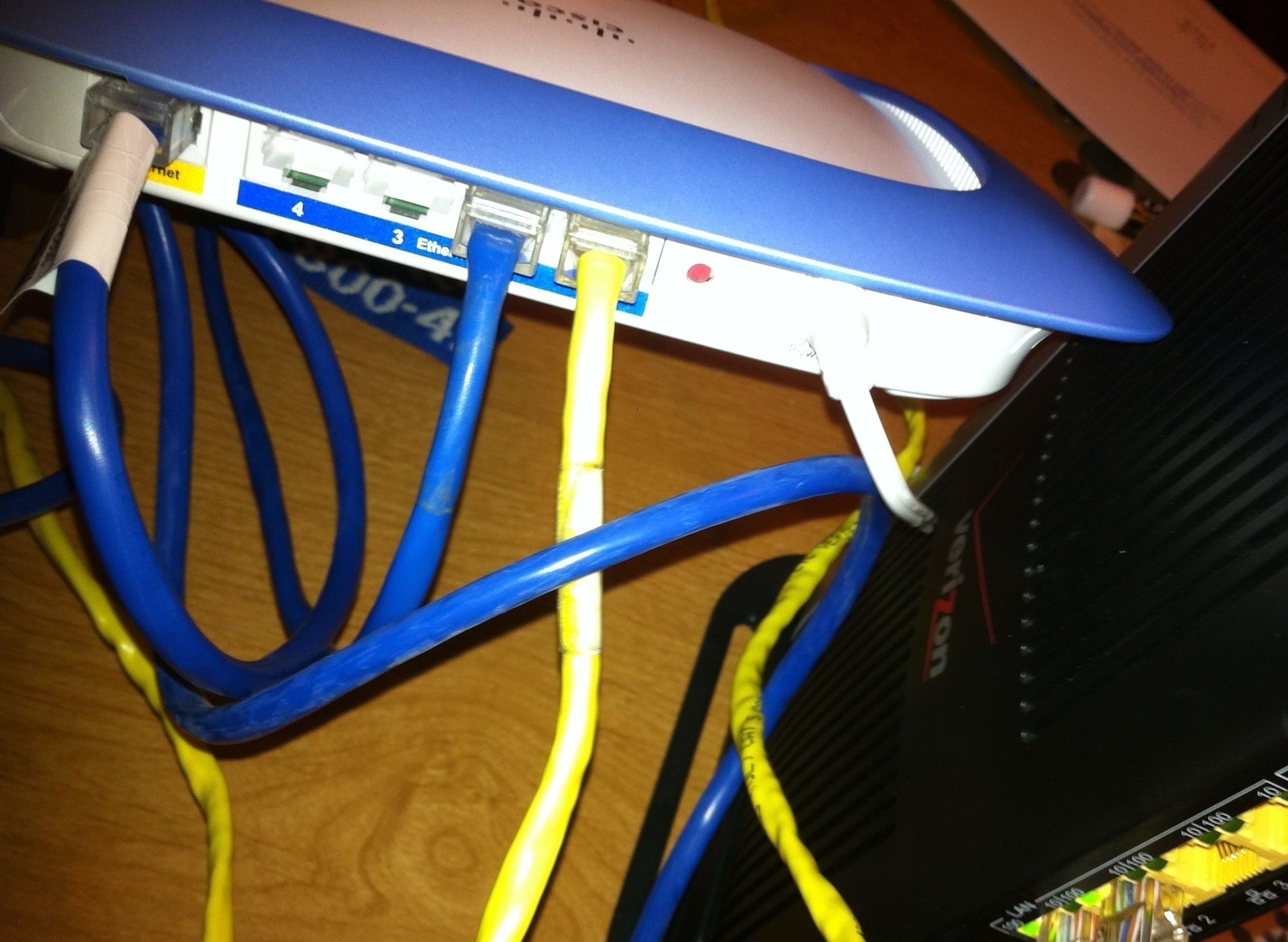
Okay so just as the title says how do i use a second router? I got a cisco valet router... I don't know how to use it because the verizon router/modem is wierd i know how to use a router if i only had a modem but fios gives router/modem so how can i use my 2nd router? The current verizon fios router/modem is b/g mode and i wanna change to b/g/n so i can get a better speed from my internet... SO how can i use my 2nd router? I tried this http://www.dslreports.com/faq/verizonfios/3.0_Networking#12506 but i don't get it can someone guide me better or make a video explaination on how to use a 2nd router? I have it connected with see as in pic i connect from my router Internet port to wan port and the ethernet lan port to the ethernet lan port on verizon fios and no work please help...
I don't believe I'm quite getting how you've connected everything. From the best I can tell, you've got a network cable connecting your Valet router's LAN port to the Valet router's Internet or WAN Port, which would be a NAT Loop in the network, and from there, the LAN Port on the Valet would be connected to the ActionTec router. First impressions of course aren't always reliable, so I will assume at this point, you did not create a loop. From what you said though, I'm running on the assumption that you meant WAN Port on the ONT, to the Internet port on your router. One cable goes to a PC, and another goes to the ActionTec router's LAN port.
Which router are you wanting to make your Primary router? The Verizon-supplied ActionTec router, making your Valet router into an Access Point and switch, or do you want to make the Valet the Primary router and simply set the ActionTec up as a MoCa Bridge for your Set Top Boxes if you have FiOS TV, and as another access point for Wireless G devices and an Ethernet switch?
How is your ActionTec router currently connected to the ONT Verizon installed? Is it being done via a Coaxial cable, or is there an Ethernet cable coming from the ONT to your ActionTec or Cisco/Valet router?
If you can give us this information, we can give you the info relavent to what you want to accomplish from that FAQ at DSLReports. There's 8 or so different combinations to set things up so we have to settle with one.
I want to make the CISCO a primary router... I don't know what MoCa bridge means i don't have tv or home phone... I just use my cell phone(smart phone) and netflix or hulu+ for tv. There is a coaxial cable from my router to my wall like a tv wire. Do i have to connect a ethernet router to my ONT box? I don't get what to do...I just want to use the CISCO router i tried enabling lan on the verizon router page but that doesn't help I have a wire going from my WAN Ethernet port and Lane Ethernet Port to the Internet Port on my router and the Lan port on my router so 2 wires is on it. Any help? I just don't get FIOS and how to setup a router with it...Also i disabled the wifi on the verizon router and still my valet router isn't working... WIFI part it doesn't seem to get the internet ip address and i don't know how to make it get it...
I am going to get another router NETGEAR N300 Wireless Router
http://www.walmart.com/ip/Netgear-WNR2000-Wireless-N-Router/10928683
so can you or other people help me connect another router please
OK, so with this, we have a few options. You appear to have a MoCa connection to the ONT, hence the coaxial cable being present.
1: The ActionTec can be bridged to the Valet router. This will not require any additional cabling, however it will require a small amount of work to have working. You will also require the ActionTec still in the mix, even though it will not be acting as a router anymore with this configuration.
Visit http://www.dslreports.com/faq/16077 and look at Option 4. There is a thread linked that will allow you to set up the ActionTec as just a MoCa bridge, and will pass the Public IP to your router. You will, in order for this to work once the ActionTec is bridged, need to connect the cable from your Valet router's Internet port, to the ActionTec's LAN port and nothing else goes to the ActionTec. From this point, your Valet should run as your primary and everything should connect through your Valet. If you are adding another router, a Netgear N300, you should perform the LAN to LAN setup, which we will talk about once you've got the Valet working correctly. LAN to LAN configs require a custom setup, so do not set up the Netgear for now.
2: This is my preferred method, which would be to run an Ethernet cable to the ONT. Option 6 in the FAQ. This will require spaking to Verizon to have them move your ONT to Ethernet, but once they do this, you can disconnect the Coaxial Cable from your ActionTec router, and plug in your CAT5/CAT6 cable from the ONT to the ActionTec's Internet/WAN port. Use the ActionTec to ensure everything is working after the switchover, and once off the phone, log into the ActionTec, perform a DHCP Release, and then prompty power off the ActionTec. Once this is done, plug the CAT6 cable into your Valet router's Internet port. You should from this point, be able to connect to the Cisco, and if the DHCP Lease was broken successfully, the Cisco should begin serving up your Internet connection. If it does not, leave the Cisco powered off for a few hours to break the DHCP lease, and then power it up. If the Valet does not work, still, give the Valet a factory reset and set up this router again, with the Ethernet cable from the ONT connected to it.
I would just take a good luck at the FAQ linked above again, and see what would work the best. Easiest thing to do is to get the ONT moved to Ethernet, which allows you to eliminate the ActionTec unless you need it in the future for TV service, and also allows you to use any router with ease.
Once the Valet is up and running and holds your Public IP address from Verizon (use http://whatismyip.com/ to determine this) , and also serves up IPs to devices on your network, post back and we can help you set up the Netgear. If you have any issues while setting this up, fall back to the ActionTec. It's factory reset will work without configuration needed, regardless of you being on Coax or Ethernet.
I have the Rev. I Actiontec which is wireless N. But still, with it I could only achieve the typical speed you'd get from a wireless g router. I hooked up an Asus router to use its wireless instead of the Actiontech's and get the full provisioned speed.
The Actiontec sux even if it is the wireless N version.
Ah I was bout to buy it you sure you don't get full speed, that is strange.
Verizon router is only 2.4 frequencies.
Typical N now supports 2.4 and 5 frequencies.
Really want wireless speed consider 802.11AC wireless routers and new 802.11AC adapters.
Guess I will just stick with my netgear router. But I don't really want 2 routers. I wish actiontec would make their router better for consumer.