This article is contributed by @Cang_Household .
This article details some standard and advanced knowledge. The official support may not cover the knowledge detailed here. As usual, (the lawyers would argue that) you are responsible for all the changes made on your devices and plans. This article does not provide warranties of any kind. By following the knowledge detailed in this article, you agree to hold both the article authors and Verizon harmless.
Fios Extender E3200 can obtain a dynamic IP from a DHCP server only if specific Vendor-Identifying Vendor-Specific Information (VIVSI) are present. The GUI lacks a handle for manually specifying the IP.
In the absence of G3100 or CR1000A/B authoritative devices, E3200 assumes a temporary IP of 192.168.1.254.
E3200 likely immediately relinquishes the 1.254 IP if it discerns that a DHCP server exists on the broadcast domain.
In DHCP DISCOVERs and REQUESTs, E3200 presents Option 60 Vendor Class Identifier (VCI) as
Verizon BHRx1 DHCP Detect
and presents Option 125 (0x7d) with Broadband Forum (3561) (0x00000de9) as the Enterprise and with encapsulated Suboption 1 (DeviceManufacturerOUI), 2 (DeviceSerialNumber), and 3 (DeviceProductClass).
DeviceManufacturerOUI is 88:03:55, which is Arcadyan Technology
DeviceSerialNumber starts with E********* for E3200
DeviceProductClass is E3200
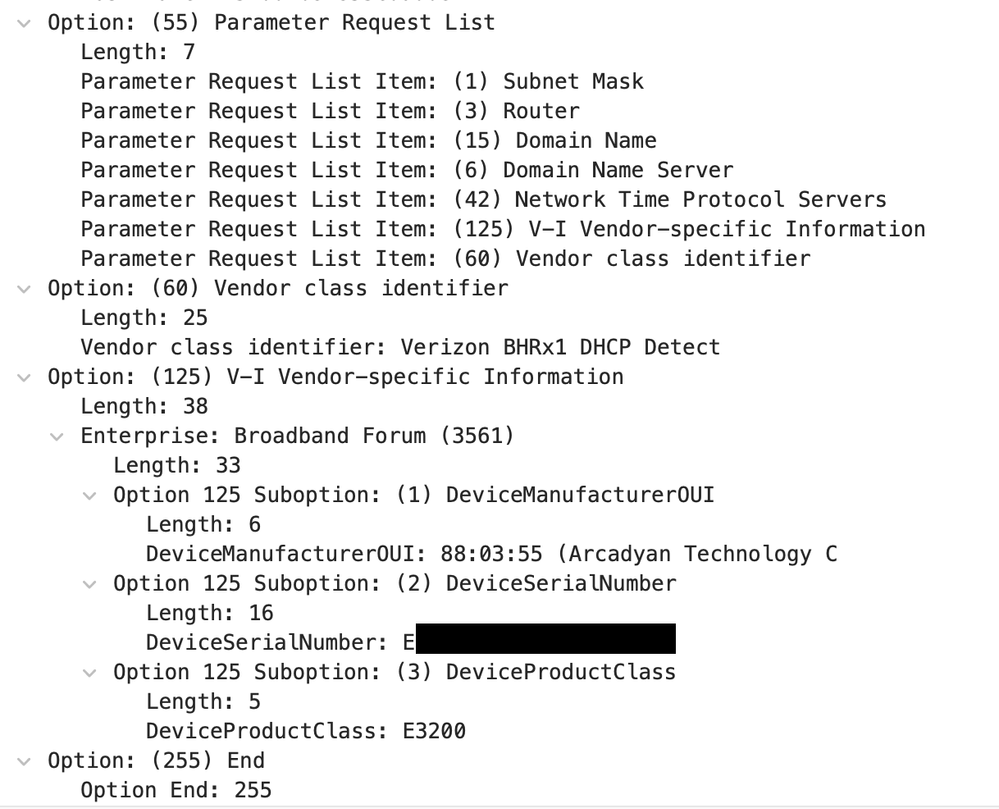
In Option 55, Parameter Request List, E3200 requests Options 1, 3, 6, 15, 42, 60, and 125.
Option 42 is ancillary. Option 60 is likely optional, but Option 125 is mandatory.
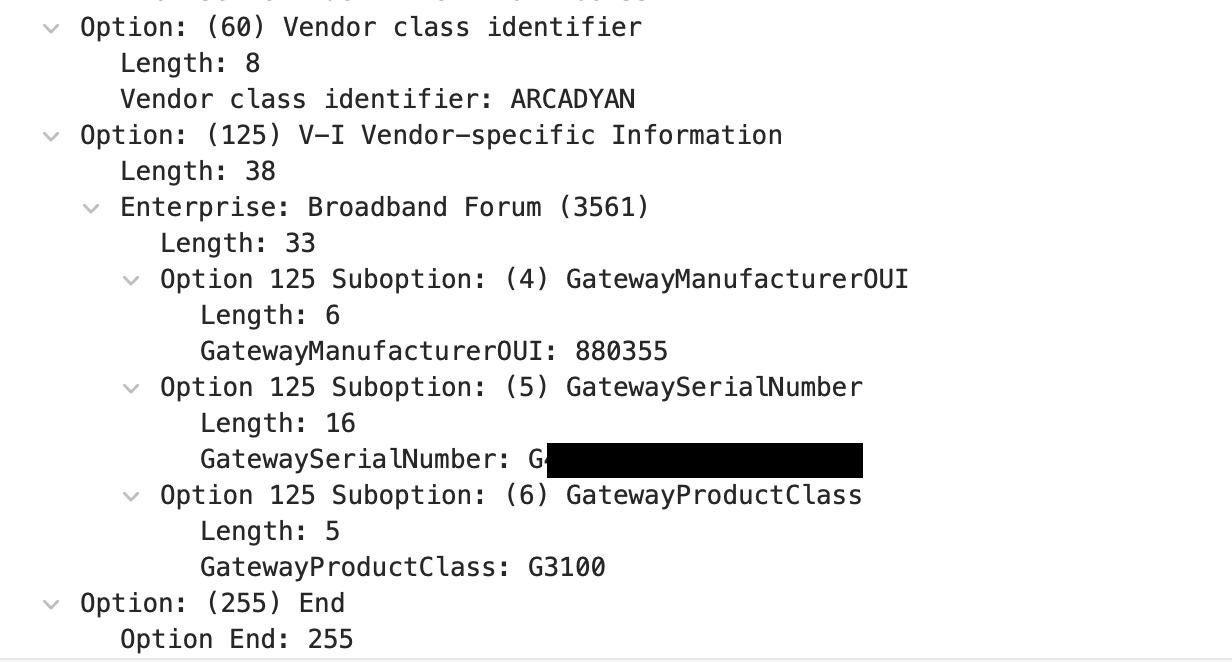
When a G3100 answers a DHCP request from E3200, Option 125 is populated with Enterprise 3561 with suboptions 4 (GatewayManufacturerOUI), 5 (GatewaySerialNumber), and 6 (GatewayProductClass).
GatewayManufacturerOUI is 08:03:55, still is Arcadyan Technology. When encoding manually to hexadecimal, you need to prepend all digits with 3, which is effectively interlaced. 08:03:55 becomes
38 38 30 33 35 35
GatewaySerialNumber starts with G******** for G3100
GatewayProductClass is G3100
I do not and cannot endorse one (software or hardware) (author or vendor) over another. They are presented for informational purposes only.
dnsmasq
dnsmasq is used by Verizon/Fios routers' DHCP servers. There are other server options available.
# in /etc/dnsmasq.conf
# set tag for device matching Option 60 VCI
dhcp-vendorclass=set:e3200,Verizon BHRx1 DHCP Detect
# use tag to respond with VCI for matching clients
dhcp-option=tag:e3200,vendor-class,ARCADYAN
# use tag to respond with VIVSI
dhcp-option=tag:e3200,vi-encap:3561,4,880355
dhcp-option=tag:e3200,vi-encap:3561,5,G*************
dhcp-option=tag:e3200,vi-encap:3561,6,G3100
# alternatively, use Option 125 with raw hexadecimal separated by colons to match with Mikrotik limitations if you want
dhcp-option=tag:e3200,125,00:00:0d:e9:21:04:::::
Mikrotik
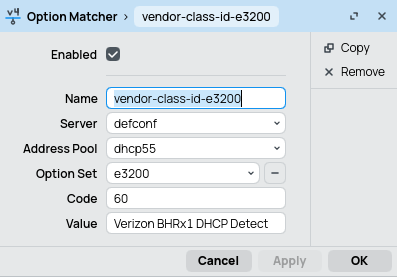
In IP > DHCP Server > Option Matcher, detect Option 60 to match BHR Detect, then apply Option Set.
In IP > DHCP Server > Option Set, pointing to manual Options 60 and 125.
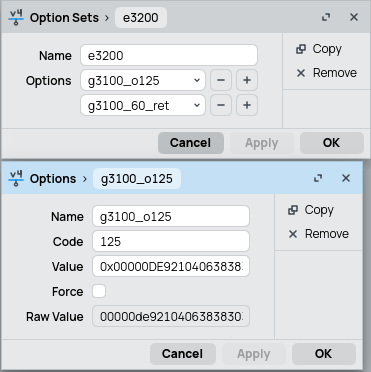
Mikrotik does not currently expose the encapsulated suboption like dnsmasq, so manual hexadecimal construction of the Option 125 value is needed.
Option 125, Option Length is auto-calculated, so omitted.
00:00:0d:e9 (Broadband Forum ID)
21 (All Suboptional field Length in Bytes)
04 (Suboption 4)
06 (Suboption Length: 6 Bytes)
38:38:30:33:35:35 (88:03:55, Arcadyan OUI)
# character 8 -> ASCII in decimal 56 -> ASCII in hexdecimal 0x38
05 (Suboption 5)
10 (Suboption Length: 16 Bytes)
47:30:30:30:30:30:30:30:30:30:30:30:30:30:30:30 (G3100 Serial G000000000000000, ficticious)
06 (Suboption 6)
05 (Suboption Length: 5 Bytes)
47:33:31:30:30 (G3100 in ASCII hexadecimal)
When pasting the hex-encoded string into the field, do 0x000de92104063838..... so long and so forth.